
On this page
- 01 · What the Whatagraph MCP does, and the five-minute setup
- 02 · Connect Whatagraph to Claude, ChatGPT or Claude Code
- 03 · Permissions and safety: what we let Claude change
- 04 · How we run it in production every day
- 05 · Prompts and question shapes that work
- 06 · The limits we have hit, and the workaround for each
- 07 · When the Whatagraph MCP is worth it, and when it isn't
- 08 · Questions we get about the Whatagraph MCP
- 09 · Sources
What the Whatagraph MCP does, and the five-minute setup
The Whatagraph MCP is a connector that lets Claude, ChatGPT or any other MCP client read the data in your Whatagraph account: every connected source, your blends, custom metrics and reports. On plans that include the build tools, it also creates and edits reports. In Claude, open Customize > Connectors, click +, search Whatagraph, click Connect, choose your Whatagraph team and click Authorize. Then ask "What do you have access to in my Whatagraph account?" to check it worked.
The connector is only as useful as what sits behind it. Whatagraph pulls Meta Ads, Google Ads, GA4, Search Console and the rest of its 68 integrations into one place, so one connector answers questions that cross every channel. We use it every day across around 40 live client dashboards: for our SEO agent's reads, for read-only audits of client ad accounts, and to build and edit reports.
If you run one store with one Google Ads account and no Whatagraph, skip it and connect Claude straight to the platform. Our guides to connecting Claude to Google Ads and GA4 and using Claude with Meta ads compare those routes.
Connect Whatagraph to Claude, ChatGPT or Claude Code
Claude on the web or desktop
- Log in to Whatagraph in the same browser first, so authorisation takes one click.
- In Claude, open Customize > Connectors and click the + next to Connectors to open the directory.
- Search Whatagraph and click Connect. It is a directory connector, so there is no server URL to paste.
- On Whatagraph's authorisation page, pick your team and click Authorize.
- Back in Claude, select the connector and set its Tool permissions (next section).
- Open a new chat and ask what it can see. It should list your connected sources and account details.
On a Claude Team or Enterprise plan, an Owner adds Whatagraph first, in Organization settings > Connectors: click Browse connectors, pick Whatagraph and click Add to your team. Each person still signs in with their own Whatagraph login, and Claude sees what that login can see in Whatagraph, nothing more.
ChatGPT
Whatagraph has an app in ChatGPT's app directory. Open the Whatagraph app page, click Connect and authorise your account. The same prompts and skills work there.
Claude Code and other MCP clients
Use the server URL https://mcp.whatagraph.com/mcp. In Claude Code it is one command, claude mcp add --transport http whatagraph https://mcp.whatagraph.com/mcp, then type /mcp inside Claude Code to sign in. A browser window opens, you pick your team and approve access. Connectors you added on claude.ai also show up in Claude Code.

Run Better Ads. The free guide + vault.
137 pages on ecommerce ads, with 46 real ads and 17 landing pages taken apart.
Permissions and safety: what we let Claude change
Claude lists each connector's tools under Tool permissions, grouped into read-only tools and tools that write or delete. Each group, or each single tool, can be set to Always allow, Needs approval or Blocked. On Team and Enterprise plans an Owner can set these for the whole organisation, and members cannot override them. Whatagraph adds its own guard on top: Claude asks before it creates or changes anything, and confirms again before it deletes.
The settings we recommend:
- Read tools: Always allow. On Needs approval, Claude stops for your click on every data pull, and an agent running on a schedule has nobody to click.
- Create and change tools: Needs approval. You see the plan before a widget moves.
- Delete tools and public share links: Needs approval, or Blocked for people who only read. A public share link puts a client's numbers on the open web.
Our ad account audits through the connector are read-only: Claude reads and reports, and changes nothing. We do let Claude build and edit reports through the MCP. Scheduled refresh settings and image uploads we still do in the Whatagraph app, and before a new or edited report reaches a client we check each tile against the raw platform data.
Whatagraph's write tools act on Whatagraph itself: reports, widgets, sources, blends, goals, custom metrics and share links. None of them touches a Meta or Google Ads campaign, so connecting Whatagraph to Claude cannot move a bid or a budget.
How we run it in production every day
Our client reports in Whatagraph are each built on Meta Ads, Google Ads and GA4, with Search Console added for clients with SEO work. Four jobs run through the MCP.
| Job | When | What it reads | Writes to Whatagraph? |
|---|---|---|---|
| SEO agent | Every day | Search Console, and GA4 enquiries, call-to-action clicks and AI-assistant visits by landing page | No |
| Ad account audits | Across every client | Each client's ad accounts, with several Claude agents in parallel | No |
| Report building and editing | New clients and every change | Templates, sources, blends and widgets | Yes, reports only |
| Client portal | Every night | Monthly budget targets and who can see which report | Yes, budget targets on our pacing report |
The daily SEO agent
Our SEO agent runs in Claude every day and pulls Search Console and GA4 through the Whatagraph connector: enquiries, call-to-action clicks and visits from AI assistants, each by landing page.
Audits with several agents at once
We audit every client's ad account through the connector, read-only, with several Claude agents working in parallel and the clients split between them. Bursts of more than about eight calls get rate-limited, so we run three to five agents at a time rather than one per client.
Building and editing reports
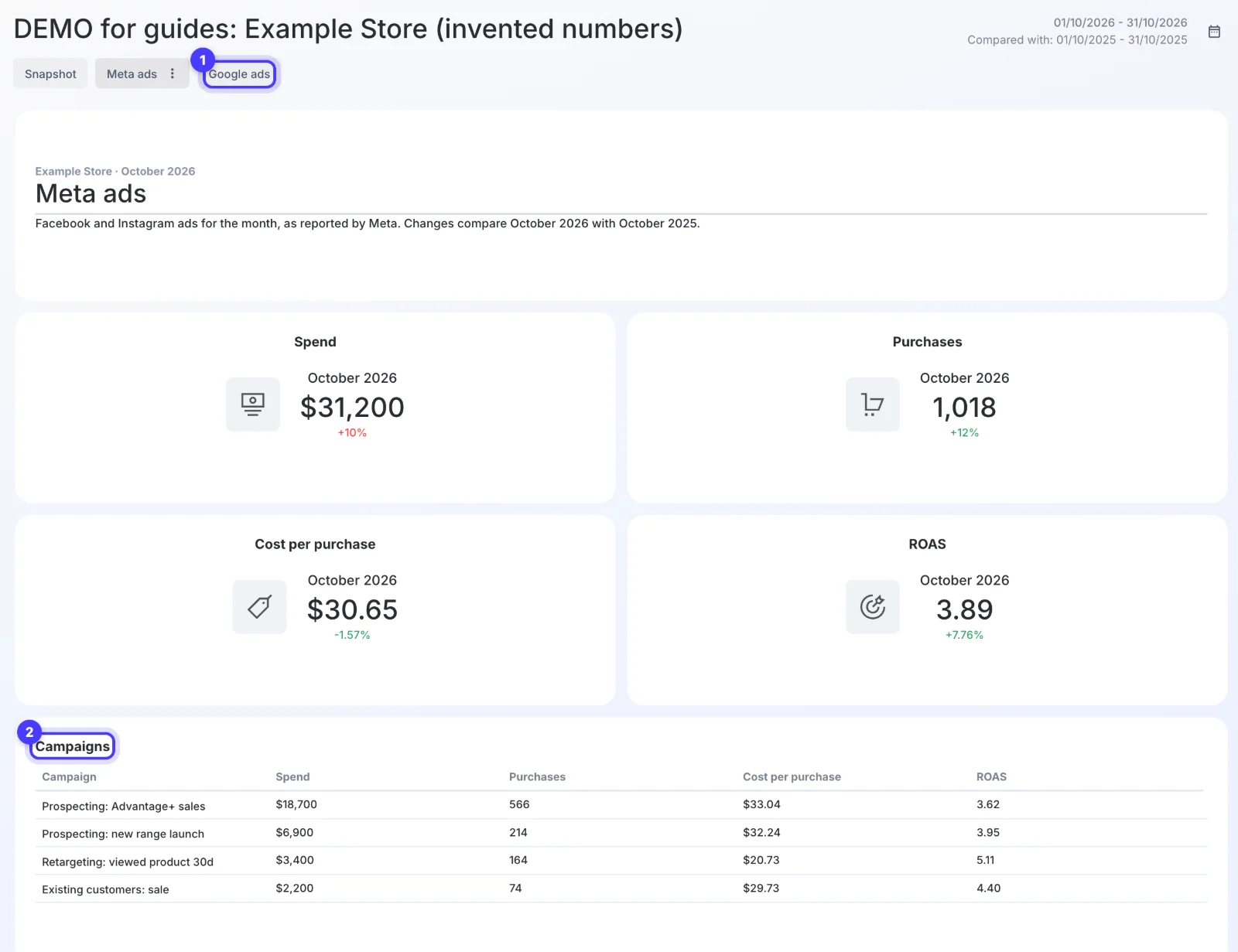
A new client report starts from one master template with seven tabs: Snapshot, Website data, Meta ads, Meta ads creative, Google ads, Audience and AI tracker. The build is the same every time: duplicate the template, swap in the client's sources, clone the ad blend and the MER blend, create the client's formula metrics and rebind every widget. Then we check every tile against the raw platform numbers. Our monthly marketing report guide shows the layout, and MER vs ROAS explains the MER row.
Our portal's nightly read
Our client portal reads Whatagraph through the same MCP server every night. It updates each client's monthly budget targets on our pacing report and checks that no client can see another client's data. If you want the pacing maths without the plumbing, use our ad budget pacing planner.
Prompts and question shapes that work
The connector answers best when the question names four things: the space or client, the source, a date range of complete days, and the shape of the answer. Whatagraph's own tips match: name the space or report (report names in brackets), give the date range, state the currency in budget questions, and load the matching skill before a long job. Ask "What skills do you have available?" to see the list, which includes fetching-marketing-metrics, auditing-account-health, cross-channel-analytics and troubleshooting-data-issues.
The four prompts below are examples written for an invented homewares brand, Example Store. Swap in your own space and report names.
A weekly channel read
"In the Example Store space, for the last 7 complete days and the 7 days before, get Meta Ads spend and purchase value, Google Ads cost and conversion value, and GA4 purchase revenue. Work out MER as GA4 revenue divided by Meta spend plus Google cost. Do not add Meta and Google revenue together. One table, then three short lines on what changed."
The last instruction matters. Meta counts view-through purchases that GA4 also claims, so adding the channel rows overstates the total.
A Search Console pull
"From the Search Console source for examplestore.com.au, last 28 days, give me clicks, impressions, CTR and average position by page, for pages containing /guides/. Then from GA4, sessions and key events for the same landing pages. Top 20 by clicks."
Need two folders? Ask for each in its own query. An OR condition inside one filter group is ignored.
An account health check
"Load the auditing-account-health skill. Check every space: list sources that are disconnected or stale, sources not assigned to a space, and reports with no automated delivery. Read only, change nothing."
A report edit
"In the [Example Store monthly] report, on the Snapshot tab, add a Pinterest row that matches the Meta row: logo, ad revenue, ad spend and ROAS. Show me the plan first and wait for my yes."
| Ask this way | Not this way | Why |
|---|---|---|
| One space, one period, named metrics | "How are all my clients doing?" | A sweep of every account trips the rate limit and comes back partial |
| "Top 25 ads by spend, last 30 days" | "Every ad, every day, last 90 days" | Responses cap at about 50 KB, and long ad-level reads time out |
| "Total revenue divided by total spend" | "Average ROAS across the group" | A source group's built-in ratio fields add up each account's ratio |
| "Read only" or "show me the plan first" | An open instruction to fix things | You decide what changes, not the model |
See the decisions behind real ads.
46 ad breakdowns and 17 landing pages, each with the next test it suggests.
The limits we have hit, and the workaround for each
| Limit | What happens | Workaround |
|---|---|---|
| Rate limits | Bursts of more than about eight calls get rate-limited, with back-offs of 25 to 60 seconds | Three to five agents at a time, never one per client |
| Response size | Responses cap at about 50 KB | Page big reads: top rows by spend, or one month per call |
| Ad-level reads | Can take over two minutes. Meta sometimes answers "data not ready", and a 90-day creative report can fail where 60 days works | Ask for 60 days, then retry after a pause |
| Search Console filters | OR conditions inside one filter group are ignored, and Google's AI features report is not exposed | One query per condition; read AI features in Search Console itself |
| Write tools | Creating, changing and deleting depend on your Whatagraph plan | Test a small edit before you plan a workflow around it |
| Permissions | On Needs approval, every read waits for a click | Always allow for read tools |
| Fresh data | GA4 backfills take hours, and the monthly date preset runs on UTC, so a new completed day lands around 11am Melbourne time | Ask about yesterday after 11am, and name the dates |
Platform quirks travel through the connector too. Google's search impression share shows a 9.99 placeholder below 10%, cost-per-result charts show $0 on days with no conversions, and Google's conversion count changes when someone changes which actions count. Claude reports those numbers as given, so the reader still needs to know them. Our guide to why marketing revenue reports disagree covers the rest.
When the Whatagraph MCP is worth it, and when it isn't
The MCP costs nothing extra: Whatagraph includes managed MCP in every plan. The real question is whether Whatagraph itself is worth it, and it is priced for agencies. The Max plan starts at US$812 a month billed annually, with 50 source credits, where one credit is one connected account.
- Worth it: agencies and in-house teams reporting across many accounts and channels, who want Claude to answer from the same blends and metric definitions as the reports their clients or bosses read.
- Not worth it for the connector alone: a single store with one Meta and one Google account. Ads Manager, Google Ads' own reports and GA4 answer most of your questions, and a direct connector covers Claude.
If you are in the first group, start a Whatagraph trial: the trial page offers a free trial with 30% off the first three months. Our Whatagraph review covers the rest of the product and its limits. If you would rather hand the reporting and the weekly read to us, tell us about your ads.
Questions we get about the Whatagraph MCP
What is the Whatagraph MCP server?
It is Whatagraph's Model Context Protocol server: a connector that lets AI assistants such as Claude, ChatGPT and Cursor query your Whatagraph data in plain language. Answers come from the same sources, blends and custom metrics as your reports, and access follows your Whatagraph user permissions.
What is the Whatagraph MCP server URL?
https://mcp.whatagraph.com/mcp. You only need it for Claude Code, Cursor and other clients that add servers by URL. In Claude, Whatagraph is in the connector directory, and ChatGPT has a Whatagraph app.
Does Whatagraph work with ChatGPT?
Yes. Whatagraph has an app in ChatGPT's app directory. Open the app page, click Connect and authorise your Whatagraph account. The same prompts and skills apply.
Which Whatagraph plans include the MCP?
Reading data works on every plan, and Whatagraph lists managed MCP in every tier. Creating, changing and deleting reports through the connector depend on your plan.
Can Claude change my reports or ad campaigns through Whatagraph?
Reports, yes, on plans with the build tools: Claude asks before it creates or changes anything and confirms again before it deletes. Ad campaigns, no. The connector's write tools act on Whatagraph reports, sources and settings, never on Meta or Google Ads.
Does Claude store my Whatagraph data?
Whatagraph says queries run live against your account and the AI app stores no Whatagraph data. The numbers Claude returns do sit in your chat history, so treat a chat about a client with the same care as that client's report.
Sources
- Whatagraph Help Center: Connect Whatagraph to your AI assistant with MCP
- Whatagraph Help Center: How to get more from your AI assistant with Whatagraph MCP
- Whatagraph: MCP
- Whatagraph: Pricing
- Whatagraph: Integrations
- Claude Help Center: Use connectors to extend Claude's capabilities
- Claude Code Docs: Connect Claude Code to tools via MCP
Disclosure: Hey Sage uses Whatagraph for client reporting and earns a referral fee when you subscribe through our Whatagraph links.