
On this page
- 01 · Can Claude run Google Ads? What works today
- 02 · The four routes compared
- 03 · Google's Google Ads MCP server: what it reads, writes and needs
- 04 · Google's Analytics MCP server for GA4
- 05 · Hosted connectors: the fast route, and the ones that write
- 06 · Why we use the Whatagraph connector
- 07 · What we ask Claude about Google Ads and GA4
- 08 · What we never let Claude do unattended
- 09 · Questions we get about Claude and Google Ads
- 10 · Sources
Can Claude run Google Ads? What works today
Claude can read your Google Ads and GA4 data as soon as you connect it through an MCP server, and some hosted connectors also let it build and edit campaigns. There are four real routes: Google's open-source Google Ads MCP server, Google's Google Analytics MCP server, a hosted third-party connector, or the connector of a reporting tool your accounts already sit in. We use the last one, Whatagraph's, because every client's Google Ads and GA4 accounts are already connected there.
Our pick: if you have a developer and one or two accounts, use Google's free servers. If you run many accounts across several channels, use the connector of the tool you report in. Wherever the data comes from, let Claude read and recommend, and make bid and budget changes yourself in Google Ads.
The four routes compared
| Route | Setup effort | Read or write | What it needs | Best for |
|---|---|---|---|---|
| Google Ads MCP server (Google, open source, free) | High: terminal, Google Cloud Console, OAuth | Reads anything the API reports. Writes only assets and labels, each with a confirm step | Cloud project with Google Ads API access, OAuth credentials, Python 3.10+, pipx | Developers and in-house teams who want raw GAQL queries |
| Google Analytics MCP server (Google, open source, free) | High: same Cloud project steps | Read-only in Google's guide | Analytics Admin and Data APIs enabled, Application Default Credentials, Python 3.10+ | GA4 questions: landing pages, funnels, realtime |
| Hosted third-party connector | Low: sign in with Google | Read, and often write (campaigns, keywords, bids) | An account with the vendor, often a paid plan | Hands-on managers who want Claude drafting changes |
| Whatagraph connector (what we use) | Low, once your accounts are in Whatagraph | Reads every connected channel. Writes to Whatagraph reports only, never to Google Ads | A Whatagraph plan with Google Ads and GA4 connected | Agencies and teams reporting across many accounts and channels |
For Meta, the same choice plays out differently, and our guide to Claude and Meta ads covers it.

Run Better Ads. The free guide + vault.
137 pages on ecommerce ads, with 46 real ads and 17 landing pages taken apart.
Google's Google Ads MCP server: what it reads, writes and needs
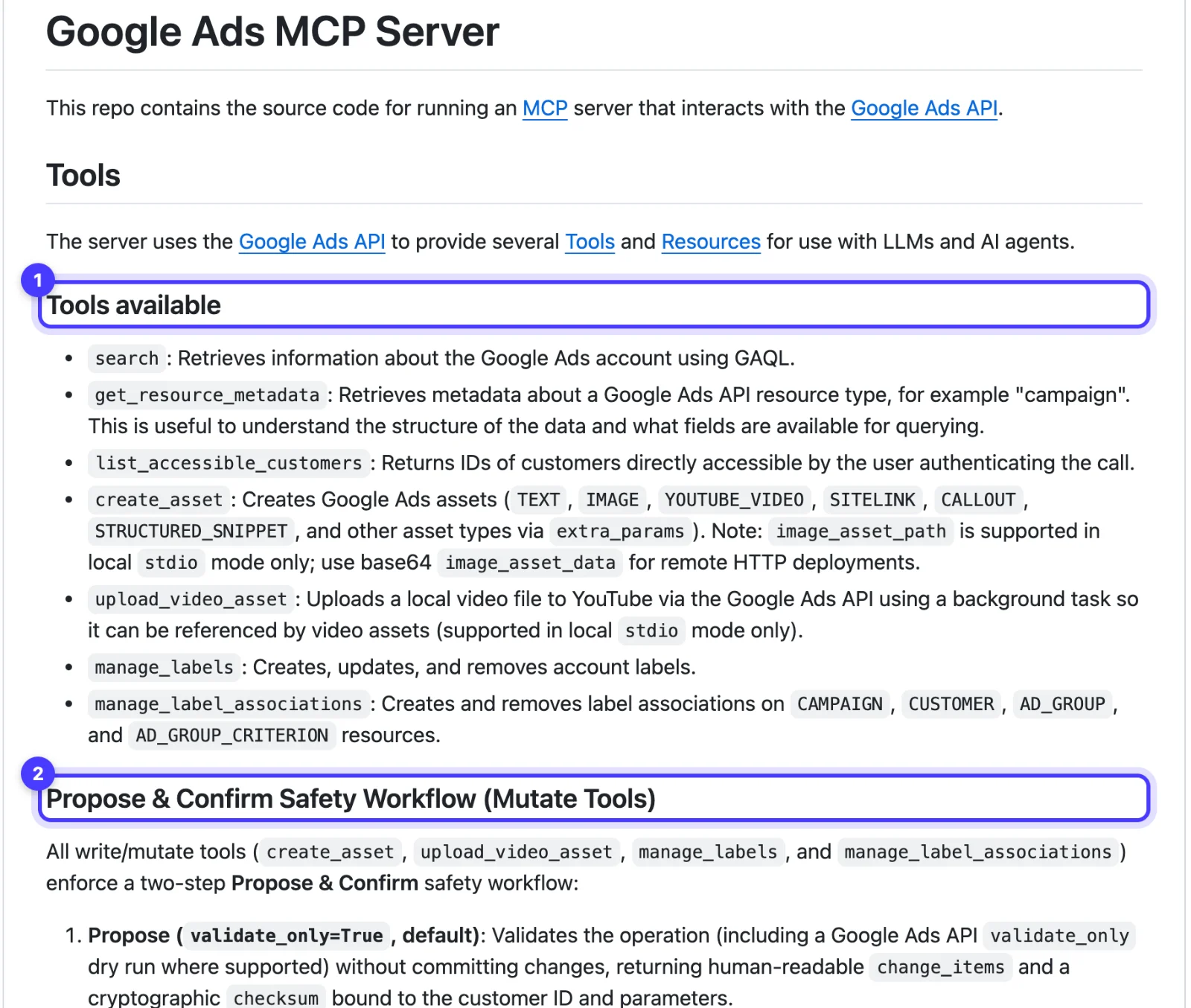
Google released the Google Ads API MCP server as open source on 7 October 2025, read-only at launch. The code lives on GitHub at googleads/google-ads-mcp, and Google's developer guide now documents version 0.0.6. The README lists seven tools:
- Read: search (runs GAQL, the Google Ads Query Language), get_resource_metadata and list_accessible_customers. Anything the reporting API exposes, Claude can query.
- Write: create_asset (text, image, YouTube video, sitelink, callout and structured snippet assets, among others), upload_video_asset (local mode only), manage_labels, and manage_label_associations, which adds or removes labels on the account, campaigns, ad groups and keywords.
Every write is two steps. The first call is a dry run by default and returns the proposed change with a checksum; the change only commits when the same request comes back with that checksum after your approval. Google's guide also lists what the server does not do: create or change campaigns, ad groups, ads, budgets or bids, or link assets to campaigns. For a strictly read-only server, set labels and assets to false in tools_config.yaml.
What you need: a Google Cloud project with the Google Ads API enabled, OAuth credentials, Python 3.10 or later, pipx and the gcloud CLI. You no longer need a developer token: Google sunset them on 9 September 2026, and API access levels now belong to the Cloud project. A new project gets Test access, which only reaches test accounts. To read a real account, apply for Explorer on the Google Ads API Overview page in Google Cloud Console. Google approves most Explorer applications automatically, for up to 2,880 operations a day against production accounts; Basic needs brand verification and Standard a manual review.
It runs locally for Claude Code, or as a remote HTTP server you deploy yourself (Google documents Cloud Run) and add to Claude as a custom connector. Google warns that a public deployment without the OAuth client ID and secret could expose the server's own credentials to anyone who calls it.
Google's Analytics MCP server for GA4
For GA4, Google publishes a separate server: googleanalytics/google-analytics-mcp on GitHub, analytics-mcp on PyPI. Google's guide describes it as read-only: it cannot create, change or delete your Analytics settings. Its tools list your accounts and properties and run reports, including run_report, run_funnel_report, run_realtime_report and run_conversions_report. The GitHub README adds a few write tools, such as creating key events, behind an --allow-write flag.
What you need: Python 3.10 or later, pipx or uv, the Google Analytics Admin API and Data API enabled in a Google Cloud project, and Application Default Credentials with the analytics.readonly scope. A service account needs the Viewer role on the property. Google's guide gives the config for Claude Desktop and Claude Code.
We have not run either of Google's servers in production. These two sections come from Google's own pages, checked on 14 November 2026.
Hosted connectors: the fast route, and the ones that write
A hosted connector is an MCP server a vendor runs for you. You sign in with Google, the vendor holds the API access, and you add it to Claude from the connector directory or by pasting its URL as a custom connector. Most can write: build campaigns, add keywords, change bids.
Two examples, checked on their own pages. Pipeboard runs a hosted Google Ads server at https://google-ads.mcp.pipeboard.co/ that reads campaign, keyword, search term, device and auction insights data, and creates and edits campaigns, ad groups, ads, keywords and bids. New campaigns are created paused, and there is a free plan. Adspirer Search Ads sits in Claude's connector directory with Anthropic's verified badge, covers Google Ads and Microsoft Advertising, and also starts new campaigns paused.
Before you connect one, find out whose Google login holds the access, whether you can block its write tools, what it costs per account or per call, and what data it keeps.
Why we use the Whatagraph connector
Every client report we run in Whatagraph is built on Meta Ads, Google Ads and GA4, so each client's Google Ads and GA4 accounts are already connected there. Whatagraph's connector hands Claude all of them through one sign-in, with no Google Cloud project or API access application of our own: Whatagraph's integration connects to the Google Ads API on its side.
- One connector for every channel. A question that needs Google Ads cost, Meta spend and GA4 revenue is one prompt, not three tools.
- The same numbers as the report. Claude reads the blends and formula metrics our clients see, including the MER blend.
- It cannot change Google Ads. Its write tools act on Whatagraph reports, so no Claude session can move a bid.
The catch is price. Whatagraph is an agency tool, from US$812 a month billed annually, so nobody should buy it for the connector alone. It also reads what Whatagraph collects, so a one-off GAQL query on an unusual field is a job for Google's server. Setup, permission settings and the rate limits we hit are in our Whatagraph MCP guide.
What we ask Claude about Google Ads and GA4
These three prompts are examples written for an invented homewares brand, Example Store, with money in AUD. Each is a job we do in client accounts.
Search terms review
"Example Store's Google Ads account, last 30 complete days. List search terms with cost, clicks, conversions and conversion value, sorted by cost. Flag terms with more than $40 spend and no conversions, and terms that point to a different product, a job search or a DIY fix. Suggest negative keywords with match types as a list. Read only: change nothing."
Read the list, then add the negatives yourself in Google Ads under Campaigns > Insights and reports > Search terms. Google leaves out terms with too little query activity, so the report never shows every search.
Performance Max channel split
"Example Store's Performance Max campaign, last 30 days. Break cost, conversions and conversion value down by channel: Google Search, YouTube, Display, Discover, Gmail, Maps and Search partners. Give each channel's share of cost and share of conversion value. Flag any channel taking more than 20% of cost while returning under 10% of value."
Check the answer against Google's channel performance report, under Campaigns > Channel performance, whose Status column flags problems such as missing assets. A worked example: YouTube takes $1,800 of a $9,000 month (20% of cost) and brings $2,400 of $60,000 conversion value (4%). Its ROAS is 1.33 against 6.67 for the campaign, so the next question is whether the video assets earn their place. Our guide to Performance Max vs Demand Gen covers when video belongs in its own campaign.
Landing page conversion rate from GA4
"From GA4 for examplestore.com.au, last 28 days, sessions where session source / medium is google / cpc. By landing page: sessions, purchases and purchase revenue. Work out conversion rate as purchases divided by sessions. Top 15 landing pages by sessions. Flag any page with more than 300 sessions converting at under half the paid search average."
Say the result shows 12,000 paid search sessions and 240 purchases: a 2.0% average. A collection page with 1,800 sessions and 14 purchases converts at 0.78%, under half the average, so that page gets fixed before anyone touches a bid. In GA4 the same view is Reports > Engagement > Landing page with Session source / medium added as a secondary dimension. Our cold traffic landing page guide covers what to change.
What makes these prompts work
- Name the account, the campaign and a date range of complete days.
- Spell out every formula. Ask for conversion rate and Claude picks a definition (per click, per session or per user); write "purchases divided by sessions" and it uses yours. For Google and Meta together, ask for MER, explained in MER vs ROAS.
- Ask for a table and name the columns.
- End with "read only: change nothing" on any connector that can write.
See the decisions behind real ads.
46 ad breakdowns and 17 landing pages, each with the next test it suggests.
What we never let Claude do unattended
Claude reads a search terms report fast and never gets bored of it. It is not accountable for the budget. We never let it change bids or budgets unattended, and the same goes for pausing or enabling campaigns, changing conversion actions and adding negatives in bulk. The connector we use cannot write to Google Ads at all.
If you connect one that can write:
- In Claude, open Customize > Connectors, select the connector and set its write tools to Needs approval or Blocked under Tool permissions.
- Never give a scheduled agent write access. Nobody is there to read the plan before it runs.
- Keep new campaigns paused until a person has checked the budget, locations and conversion goal.
- Check one total against the Google Ads interface before acting on any number.
Three quirks we see when reading Google data through Whatagraph: Google's conversion count changes when someone changes which actions count, search impression share below 10% shows as a 9.99 placeholder, and the monthly date preset runs on UTC, so a new completed day lands around 11am Melbourne time. Our Google Ads account structure guide helps keep the numbers readable in the first place. If you would rather hand the reading and the changes to people who do it every day, that is our Google Ads management, and you can start here.
Questions we get about Claude and Google Ads
Can Claude run Google Ads?
Claude can read Google Ads data through Google's own MCP server or a connector, and some hosted connectors let it create and edit campaigns, ad groups, keywords and bids, usually starting new campaigns paused. Google's own server cannot change campaigns, budgets or bids. We let Claude read and recommend, and a person makes the changes.
Is there an official Google Ads MCP server?
Yes. Google released the open-source Google Ads API MCP server on 7 October 2025, at googleads/google-ads-mcp on GitHub. It reads any account you can access through GAQL, and its only write tools create assets, upload videos and manage labels, each behind a propose-and-confirm step.
Do I need a Google Ads developer token to connect Claude?
No. Google sunset developer tokens on 9 September 2026. API access now follows the Google Cloud project behind your OAuth credentials, and a project needs Explorer access or higher to reach real accounts. Hosted connectors and Whatagraph hold the API access for you.
How do I connect Claude to GA4?
Google's Analytics MCP server is free and read-only in Google's guide: enable the Analytics Admin and Data APIs in a Cloud project, sign in with Application Default Credentials and add the analytics-mcp config to Claude Desktop or Claude Code. If GA4 already sits in a reporting tool with a connector, such as Whatagraph, that connector reads it with no extra setup.
Can Claude see Google Ads and Meta ads together?
Yes, with a connector that holds both or with two connectors in one conversation. A reporting tool such as Whatagraph puts Google Ads, Meta and GA4 behind one connector, which is how we ask cross-channel questions.
Sources
- Google Ads API: Google Ads MCP server developer integration guide
- GitHub: googleads/google-ads-mcp
- Google Ads Developer Blog: Open source Google Ads API MCP server (7 October 2025)
- Google Ads API: Access levels and permissible use
- Google Analytics: Try the Google Analytics MCP server
- GitHub: googleanalytics/google-analytics-mcp
- Google Ads Help: About the channel performance report
- Google Ads Help: About the search terms report
- Analytics Help: Landing page report
- Pipeboard: Google Ads MCP
- Claude: Adspirer Search Ads connector
- Claude Help Center: Use connectors to extend Claude's capabilities
- Whatagraph Help Center: Connect Whatagraph to your AI assistant with MCP
- Whatagraph: Google Ads integration
Disclosure: Hey Sage uses Whatagraph for client reporting and earns a referral fee when you subscribe through our Whatagraph links.