
On this page
- 01 · How to get Meta Ad Library data into Claude
- 02 · Three routes compared: Meta's server, the Ad Library API and an ad library tool
- 03 · Connect Adspo to Claude, step by step
- 04 · What the connector can do once it is connected
- 05 · Seven prompts we use for ad research in Claude
- 06 · The checks we still do by hand
- 07 · What not to ask it
- 08 · Questions we get about Claude and the Meta Ad Library
- 09 · Sources
How to get Meta Ad Library data into Claude
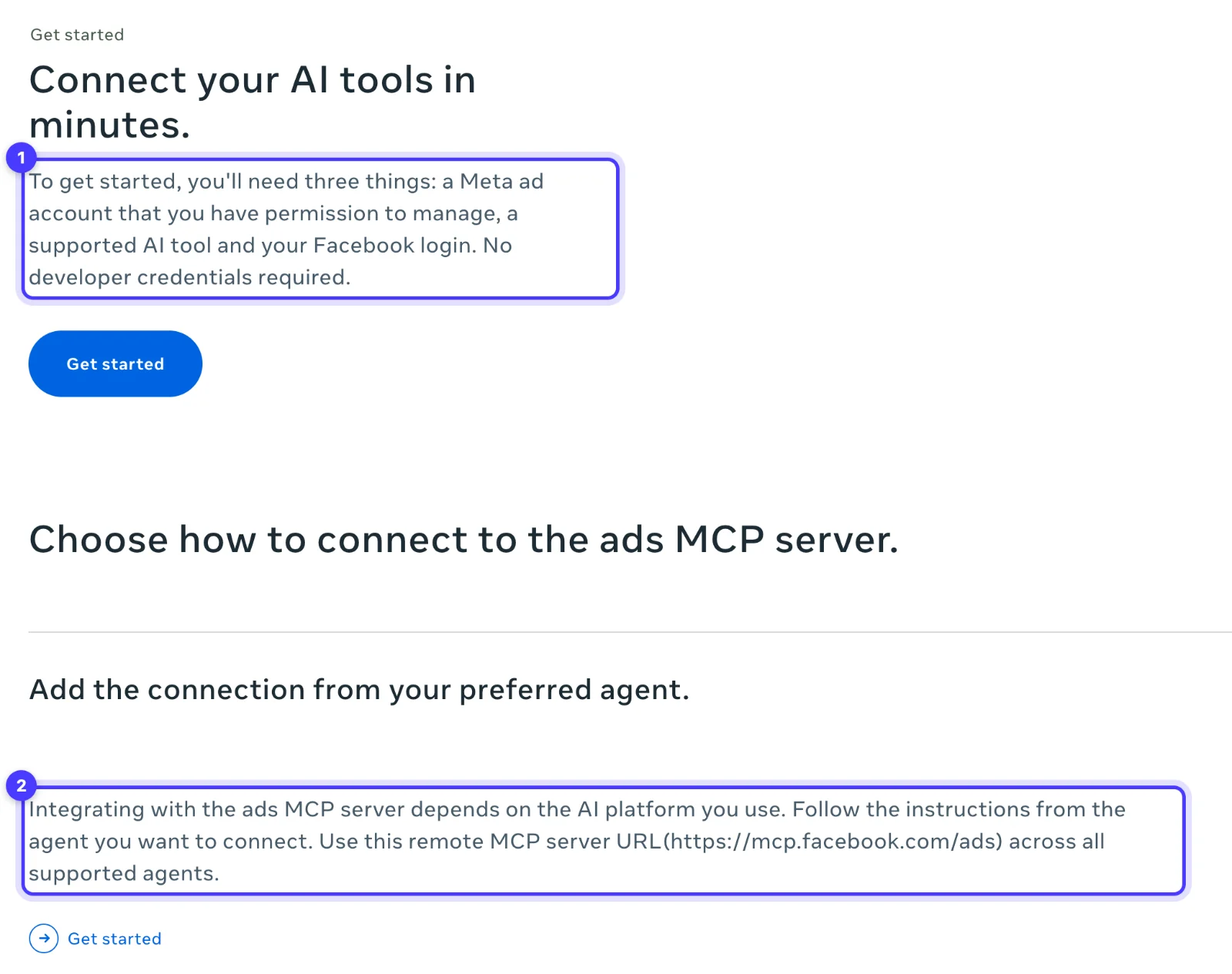
There are two connectors that work today, and you add both the same way. In Claude, open Customize > Connectors, click + Add, choose Add custom connector, paste the server URL and sign in. Meta's official option is its ads MCP server (https://mcp.facebook.com/ads), which is in open beta, connects Claude to an ad account you manage and includes a tool that searches the public Ad Library. For creative research we connect Adspo instead (https://mcp.adspo.co), because it gives Claude full transcripts, visual format tags, each brand's creatives ranked by how much they were served, and our saved boards.
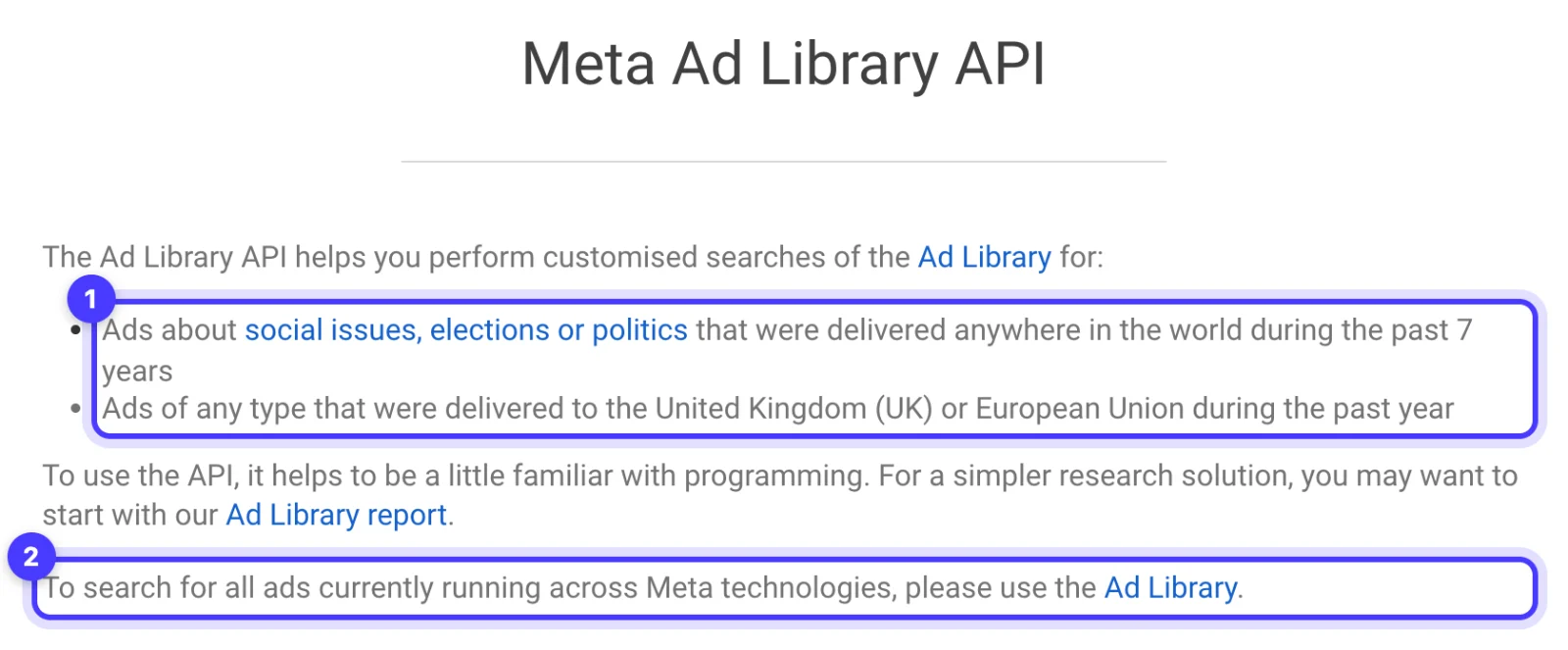
Meta's Ad Library API looks like the obvious route and is the wrong one for Australian brand research: outside the UK and EU it only returns ads about social issues, elections or politics. Custom connectors work on every Claude plan, including Free, which allows one. The rest of this page covers the setup, what the connector can do, the prompts we run for client research and what we still check with our own eyes.
Three routes compared: Meta's server, the Ad Library API and an ad library tool
| Route | What you need | What Claude gets for ad research | When we use it |
|---|---|---|---|
| Meta ads MCP server | A Meta ad account you manage, your Facebook login, and an account included in Meta's phased rollout | One Ad Library search tool, next to reporting and campaign tools for your own account | Reporting and campaign work in an account you manage |
| Meta Ad Library API | Identity confirmation at Facebook.com/ID (can take a few days), a Meta for Developers account, an app, and your own code | Political and issue ads from anywhere over the past 7 years, and any ad delivered to the UK or EU over the past year. An ad that only reached Australia comes back only if it is political | Political and issue ad research |
| An ad library tool with an MCP server (we use Adspo) | A subscription to the tool | Creative-level records with transcripts, hooks, format tags, landing pages, impressions rank within each brand, and your boards | Competitor sweeps, persona boards, hook and offer research, brief preparation |
Two things about Meta's server matter for research. It gives Claude permission to create and edit campaigns in your ad account. New campaigns land as drafts, and anyone with full control of the business portfolio can block actions per ad account in Meta Business Suite under Settings, Integrations, Ads MCP server, but when someone only needs research we would rather not give their Claude that access. And Meta documents its Ad Library tool in one line among dozens of account tools, with no transcript, format or ranking features listed, so we treat it as a search box.
The free Meta Ad Library website searches all ads currently running across Facebook and Instagram at no cost, and for a one-off look at one competitor it is enough; our guide to seeing a competitor's Facebook ads walks through it. A connector earns its place when you research across many brands, read transcripts at volume or brief from saved boards every week.

Run Better Ads. The free guide + vault.
137 pages on ecommerce ads, with 46 real ads and 17 landing pages taken apart.
Connect Adspo to Claude, step by step
- Start an Adspo trial. MCP and API access come with the Pro plan: US$29 a month billed monthly, or US$19 a month billed yearly (prices in US dollars), with a 7-day free trial on monthly and 14 days on yearly.
- In Claude on the web or the desktop app, open Customize > Connectors.
- Click + Add, then Add custom connector.
- Name it Adspo, enter https://mcp.adspo.co as the remote MCP server URL and click Continue.
- Claude detects the authentication settings. Leave them as detected and click Continue. Under Authentication choose Sign in now, keep Use Claude's published identity (Recommended) under OAuth client, and click Add.
- Sign in with your Adspo account when asked and approve access.
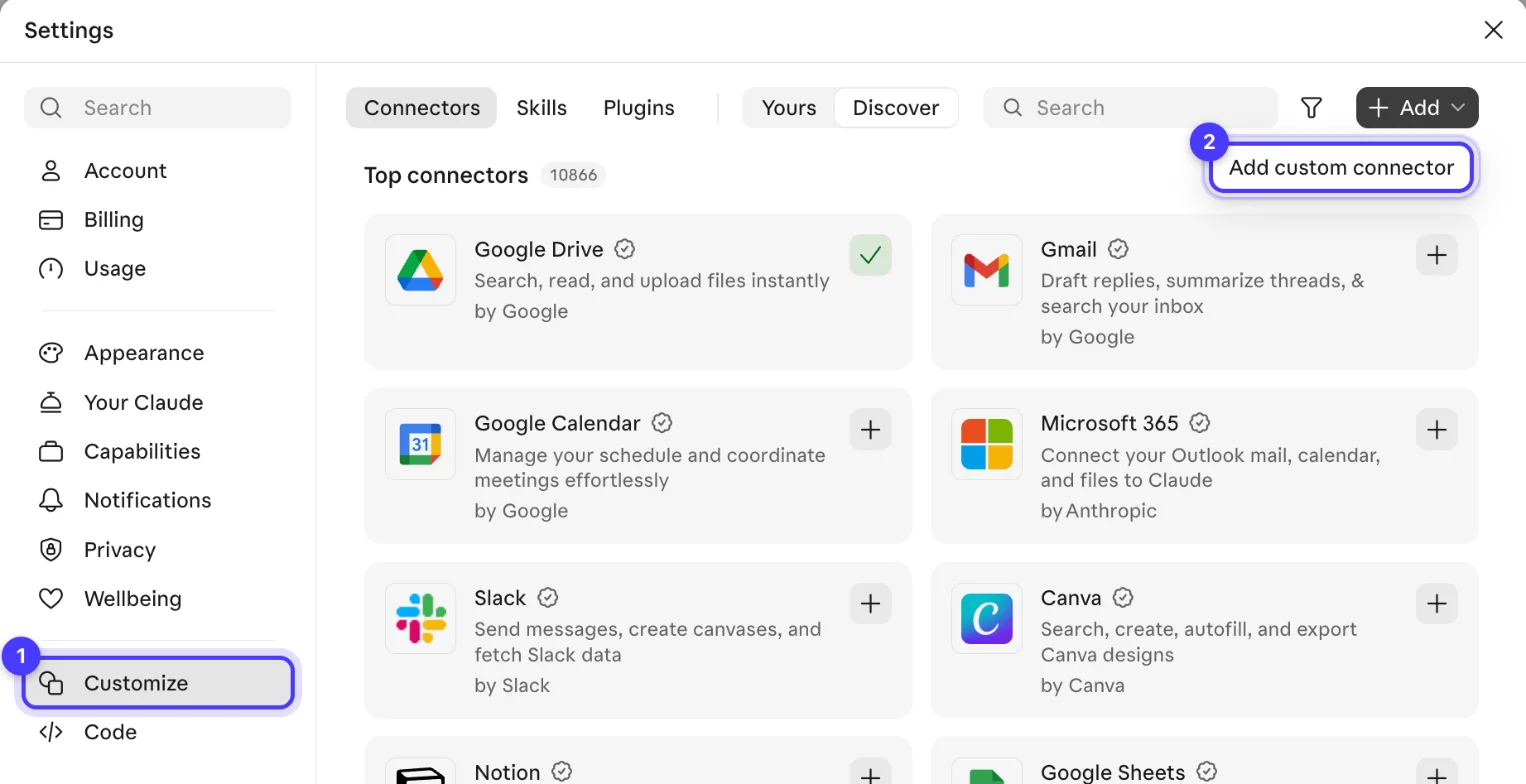
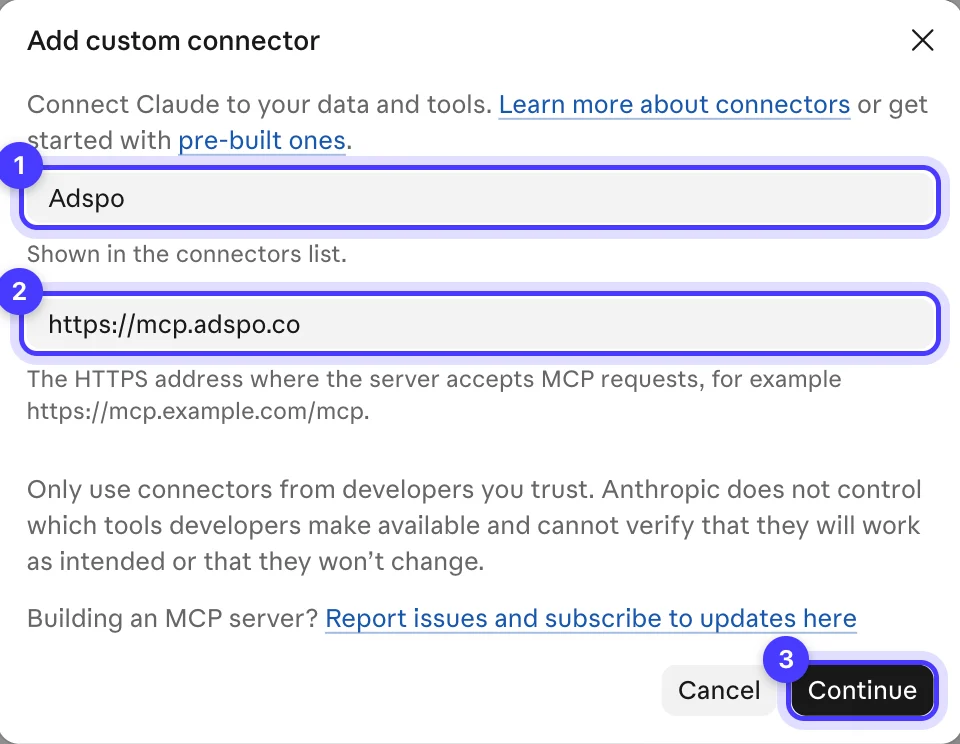
On a Team or Enterprise plan, an Owner or Primary Owner (on Enterprise, also a custom role with Manage access to Libraries) adds it under Organization settings > Connectors: Add, hover over Custom, select Web, same URL. Each member then finds it in Customize > Connectors, usually labelled Custom, and clicks Connect. Meta's server goes in the same way with https://mcp.facebook.com/ads and the Facebook profile that has access to the ad account.
Check it works
Open a new chat, click the + button in the lower left, choose Connectors and switch Adspo on. Then ask something you already know the answer to: "List my Adspo workspaces and the boards in each." Real workspace and board names mean the connection is live. The connector runs on a credit allowance, so before a big sweep ask Claude to check your Adspo usage.
What the connector can do once it is connected
You ask in normal sentences and Claude picks the tools. These are the jobs we use it for every week; we keep one Adspo workspace per client brand, more than 20 of them.
- Search inside ads by phrase. It searches ad copy, video transcripts, on-screen text and landing page URLs, or just one of those. It matches the exact phrase and returns results in your chosen sort order rather than by relevance, so ask for several phrasings and more than one page.
- Filter by visual format. Each creative carries format tags such as Talking Head, Before & After, Us vs Them, Unboxing and Founder Story. A style of ad is a format filter: "talking head" as a search phrase only finds ads that say those words.
- Narrow the set. Country (AU for ads delivered in Australia), language, active or inactive, launch dates, runtime, image or video, and brand category.
- Read a brand's most-served creatives. It can sort a brand's creatives by impressions rank, where rank 1 is the creative that brand has served most. Add active only and you see what the brand is backing right now.
- Read full copy and transcripts. It pulls a video's full transcript with timestamps, plus the copy, hook, landing pages and the ads behind each creative.
- Read your boards and followed brands. It reads boards, followed brands and brand groups inside a workspace. It can also save ads, create boards and follow brands, which we only let it do when the prompt asks.
Seven prompts we use for ad research in Claude
Each prompt names the workspace, the brands or the problem, the filters and the shape of the answer. Swap the square brackets for your own details. Under each is what good output looks like, so you can tell when Claude has cut a corner.
1. Competitor sweep
"In the [brand] workspace, get the active creatives for [competitor A], [competitor B] and [competitor C], sorted by most impressions. For each brand, give me the top 10 with impressions rank, launch date, runtime, format tags, hook and landing page. Then list the angles that show up at two or more of the brands, naming the creatives behind each."
Good output: one table per brand, then three to five shared angles, each pointing at creatives you can open. A short table needs a question: fewer active creatives, or Claude stopped at the first page.
2. Persona research by problem
"Persona: [one situation and one pain point, for example a renter whose dog sheds on the couch]. Search copy, transcripts and on-screen text for phrases this person would say: [phrase 1], [phrase 2], [phrase 3]. Include categories outside ours. Keep only ads where a line or a demonstration hits that exact pain, quote the line with its timestamp, drop near-duplicates and stop at 20. Tell me which searches came back empty."
Good output: up to 20 distinct ads, each with the quoted matching moment. Twelve real matches and a list of empty searches beats 20 padded with ads that share a mood. This starts the 20-ad persona boards we brief from (no more than two from the client's own brand); our guide to persona ad sets shows how personas become ad sets.
3. Hook inventory from transcripts
"For [brand]'s 15 most-served active video creatives, get the full transcripts. Give me the first two sentences of each word for word, the second at which the product is first named, and group the hooks by type: problem call-out, bold claim, question, demonstration, social proof."
Good output: verbatim opening lines grouped by type, each linked to its creative. Paraphrased hooks mean Claude summarised instead of reading; ask it to fetch the transcripts.
4. Offer audit
"Search active ads from [brands], delivered in AU and launched in the last 60 days, for each of these phrases: 'free shipping', 'bundle', 'gift with', 'subscribe', 'sale ends'. For each brand, list the offers in rotation, the exact wording in the copy or on-screen text, and the landing page each one sends to."
Good output: a brand by offer table with quoted wording and landing pages. Search matches exact phrases, so an empty cell only covers that wording; add your category's variants before drawing a conclusion.
5. Format gap analysis
"Using format tags, count the active creatives in each visual format for [our brand] and for [competitors A to C]. Then list the formats in the competitors' top 20 by impressions that we are not running at all, with two example creatives for each."
Good output: a count table and two or three gaps, each with examples. Tags can be wrong, so watch the examples before a gap goes into a brief. Our weekly paid creative system shows how a gap becomes a test.
6. Board readback before a brief
"Read the board [board name] in the [brand] workspace. For each creative, give the hook, the format tags, the moment that matches [persona], whether it is still active, and whether it is a near-duplicate of anything else on the board."
Good output: one line per creative, duplicates and inactive ads flagged. We run it before every brief. Building the board itself is covered in our ad swipe file guide.
7. Seasonal research
"Find creatives delivered in AU that launched between [1 November] and [5 December] last year and mention 'Black Friday', 'Cyber Monday' or 'early access', in [category] and two adjacent categories. Sort by longest running. Summarise when brands started, the offer mechanics and the formats they used."
Good output: a launch timeline, the offer mechanics with examples, and the formats that ran longest. We turn this into a seasonal board per brand, topped up with around 50 curated ads, and plan spend with our BFCM budget and launch plan.
See the decisions behind real ads.
46 ad breakdowns and 17 landing pages, each with the next test it suggests.
The checks we still do by hand
Claude works from transcripts, copy, tags and metadata, and any of those can be wrong. Before anything goes on a board or into a brief:
- Open the actual creative. Watch the video or look at the image. The matching moment has to be in the creative itself: overlay text, a voiceover line or a demonstration. Advertiser identity or a similar visual mood does not count.
- Check the transcript against the video. A transcript can be mismatched to its creative, and hooks sometimes come through cut short. Language tags slip too: in a test search while writing this guide, an English voiceover came back tagged as Dutch. For English-language boards we keep English messaging or a demonstration that works without words.
- Watch for the wrong meaning. The same test search, for a pain-related phrase, returned a page of backpack ads. Use the category filter to cut unrelated meanings, then run one unfiltered pass before deciding nothing exists.
- Merge near-duplicates. The same footage with a shorter script or a lightly changed hook is one concept, and Claude will count it as two unless told otherwise.
- Look past the first page. Ask for the next page, or rerun with a different sort.
- Never copy. We take the pattern, never the ad. Each save becomes a test written as observed pattern, customer tension, our hypothesis, original execution, proof and decision metric, made with the brand's own evidence and customer language. Our Meta ads strategy guide covers that step.
What not to ask it
An ad library shows what brands run, never their sales, ROAS, budget or targeting, and Claude will fill that gap with a confident guess if the prompt invites one. We keep these out of our prompts:
- Spend and ROAS. For commercial ads in Australia, nobody outside the advertiser's account has these numbers. Ask which ad is most profitable and you get an invented answer.
- Targeting. The connector shows target countries. It cannot see age, interest or custom audience settings.
- Rankings across brands. Impressions rank is relative within one brand's account. Rank 1 at a small brand and rank 1 at a large one are very different volumes.
- Proof of a winner. Longevity, ad count and apparent scale are research signals. Runtime alone can mislead: an ad can stay live because it is cheap retargeting, brand activity, a small market or simply forgotten. Our guide to finding winning Facebook ads covers how we weigh them.
- Channels and categories it does not hold. Adspo covers Meta (Facebook and Instagram), not Google, TikTok or YouTube, and leans towards ecommerce and DTC brands. We searched skip bins, rubbish removal, junk removal and plant hire by name and domain and found nothing, so for local trade and service brands we work the Meta Ad Library directly.
Our Adspo review covers where the tool fits and falls short in more depth. If you would rather hand the research and creative testing to a team that runs it every week, tell us about your brand.
Questions we get about Claude and the Meta Ad Library
Is there an official Meta Ad Library connector for Claude?
Meta's official connector is its ads MCP server, in open beta, added to Claude as a custom connector at https://mcp.facebook.com/ads. It includes an Ad Library search tool, but it is built for managing your own ads and needs an ad account you manage that is in Meta's phased rollout.
How do I connect the Meta Ad Library to Claude?
In Claude, open Customize > Connectors, click + Add, choose Add custom connector, enter https://mcp.facebook.com/ads (Meta) or https://mcp.adspo.co (Adspo) and sign in. Then switch it on for a chat from the + button, under Connectors.
Can Claude use the Facebook Ad Library API?
Only through a developer setup with identity confirmation, a Meta for Developers account and an app. Outside the UK and EU the API only returns ads about social issues, elections or politics, so ads that only ran in Australia come back only if they are political.
Do I need a paid Claude plan to add a custom connector?
No. Custom connectors work on Free, Pro, Max, Ultra, Team and Enterprise plans, and Free allows one. Meta charges nothing extra for its server. Adspo Pro is US$29 a month, or US$19 a month billed yearly.
How do I use Claude for Facebook ads?
With a research connector, Claude searches competitor ads, reads transcripts and checks boards before a brief. With Meta's ads MCP server, it reports on your own campaigns and drafts new ones for a person to review. We keep budget and creative decisions with a person.
What is a good Claude prompt for Facebook ad research?
Name the workspace, the brands or customer problem, the filters, the fields you want back and the shape of the answer. Ask Claude to quote the matching line, drop near-duplicates and say which searches came back empty.
Sources
- Anthropic Help Centre: Get started with custom connectors using remote MCP
- Meta for Business: Meta ads MCP server
- Meta for Developers: Ads MCP server, ad creation and management tools
- Meta Business Help Centre: Manage ads from an AI agent with Meta ads AI connectors
- Meta Ad Library API
- Adspo: MCP and API access, Pro plan and pricing
Disclosure: Hey Sage uses Adspo for client work and earns a referral fee when you subscribe through our Adspo links.