
On this page
- 01 · How to see a competitor's Facebook and Instagram ads
- 02 · Find every Page and Instagram account a competitor advertises from
- 03 · What you can see about their targeting, budget and performance
- 04 · What you can reasonably infer, and how much weight to give it
- 05 · Our weekly competitor check: what we record for each competitor
- 06 · Worked example: a one-page competitor log
- 07 · How we track competitors in Adspo
- 08 · Turning competitor observations into tests
- 09 · Questions we get about seeing competitors' ads
- 10 · Sources
How to see a competitor's Facebook and Instagram ads
Open the Meta Ad Library, set the country to Australia and the category to All ads, type the competitor's name into Search by keyword or advertiser and choose their Page from the Advertisers list. You see every ad that Page has running, with the date it started and the platforms it runs on. For their Instagram ads only, open Filters and set Platform to Instagram. Anyone can search the library without logging in.
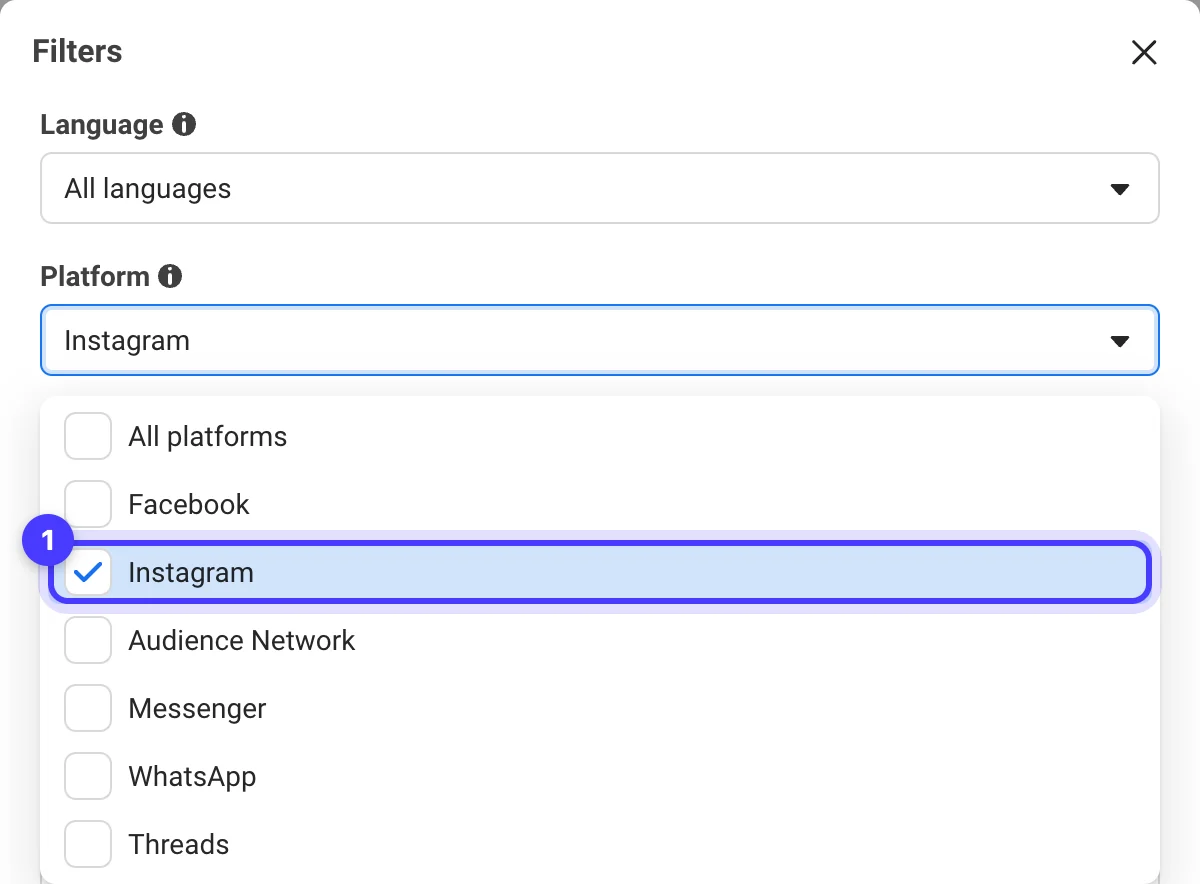
Our Meta Ad Library guide for Australia walks through every filter. This page covers the research around the lookup: finding every account a competitor advertises from, knowing what the library hides, and keeping a weekly record, because an ordinary ad that stops running drops out of the library and takes its history with it.
For one or two competitors, the free library and a spreadsheet are enough. Past that, we track the brands in Adspo, which keeps each creative with its launch and turn-off dates and alerts us when a new one goes live.
Find every Page and Instagram account a competitor advertises from
Most competitors advertise from more than one place. Type a brand name into the Ad Library and the Advertisers list shows each matching Page with its handle, followers and category (overseas Pages also show their country), and the connected Instagram account on the line below. Larger brands run a Page per country: pick the Australian one, and check the overseas Pages too if they ship here.
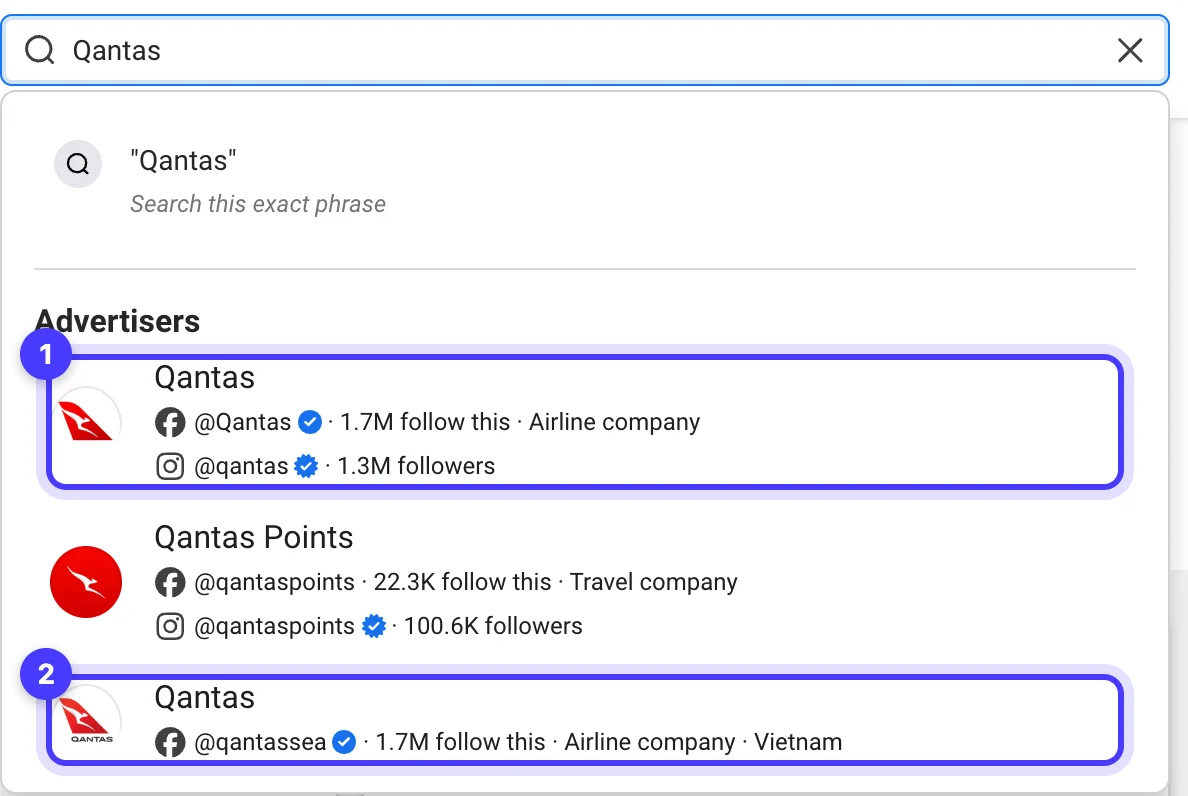
- Sub-brand and product Pages. Outlet stores, gifting ranges and second product lines often run from their own Page. Search each by name.
- Their domain as an exact phrase. Type the domain and choose Search this exact phrase to surface founder Pages, creators, stockists and affiliates running ads that include it.
- Instagram-only advertisers. A business boosting from its Instagram professional profile for the first time needs no Facebook Page, so search the @handle too. On their Instagram profile, tap the menu, choose About this account and look under Active ads, which opens their ads in the Ad Library. You need to be logged in to Instagram for this screen.
- Accounts with shared followers. The same screen lists the public accounts with the most followers in common, the quickest way we know to find adjacent brands.
- Creator posts. The Ad Library's Branded content tab holds paid partnership posts created on or after 17 August 2023, searchable by Page or Instagram profile.
Then confirm you have the right Page. On Facebook, click the Page's name under the cover photo, then Transparency and privacy policy; the same details show when you open the Page in the Ad Library. Page transparency lists the creation date, previous names, merges, the countries the Page is managed from and the confirmed business that owns it, which is how you tell a brand's own Page from a reseller with a similar name.

Run Better Ads. The free guide + vault.
137 pages on ecommerce ads, with 46 real ads and 17 landing pages taken apart.
What you can see about their targeting, budget and performance
For an ordinary commercial ad delivered in Australia, the Ad Library shows the creative, the copy, the Library ID, the Started running date, the platforms and a This ad has multiple versions label where there are variants. See ad details adds each version and the advertiser's Page details. There is nothing on targeting, cost or results. Two kinds of ad carry more:
| What you want | Ordinary ads in Australia | Ads that also deliver to the UK or EU | Ads about social issues, elections or politics |
|---|---|---|---|
| Creative, copy, start date, platforms | Yes | Yes | Yes |
| Targeting | No | Age, gender and location choices per ad, included or excluded | Page-level audience selections and estimated audience size |
| Reach or impressions | No | Reach in the UK and EU by location, age and gender | Impressions as a range, split by age and gender |
| Spend | No | No | Amount spent as a range |
| Sales, clicks, ROAS | No | No | No |
| Stays in the library | While active | One year after the last impression | Seven years |
So the only view of a commercial competitor's targeting comes from ads that also delivered to the UK or EU, which carry an EU transparency label on the card and a Transparency by location section, with European Union and United Kingdom tabs, under See ad details. Read it as how they set up that market. Their Australian ad sets can be built differently.
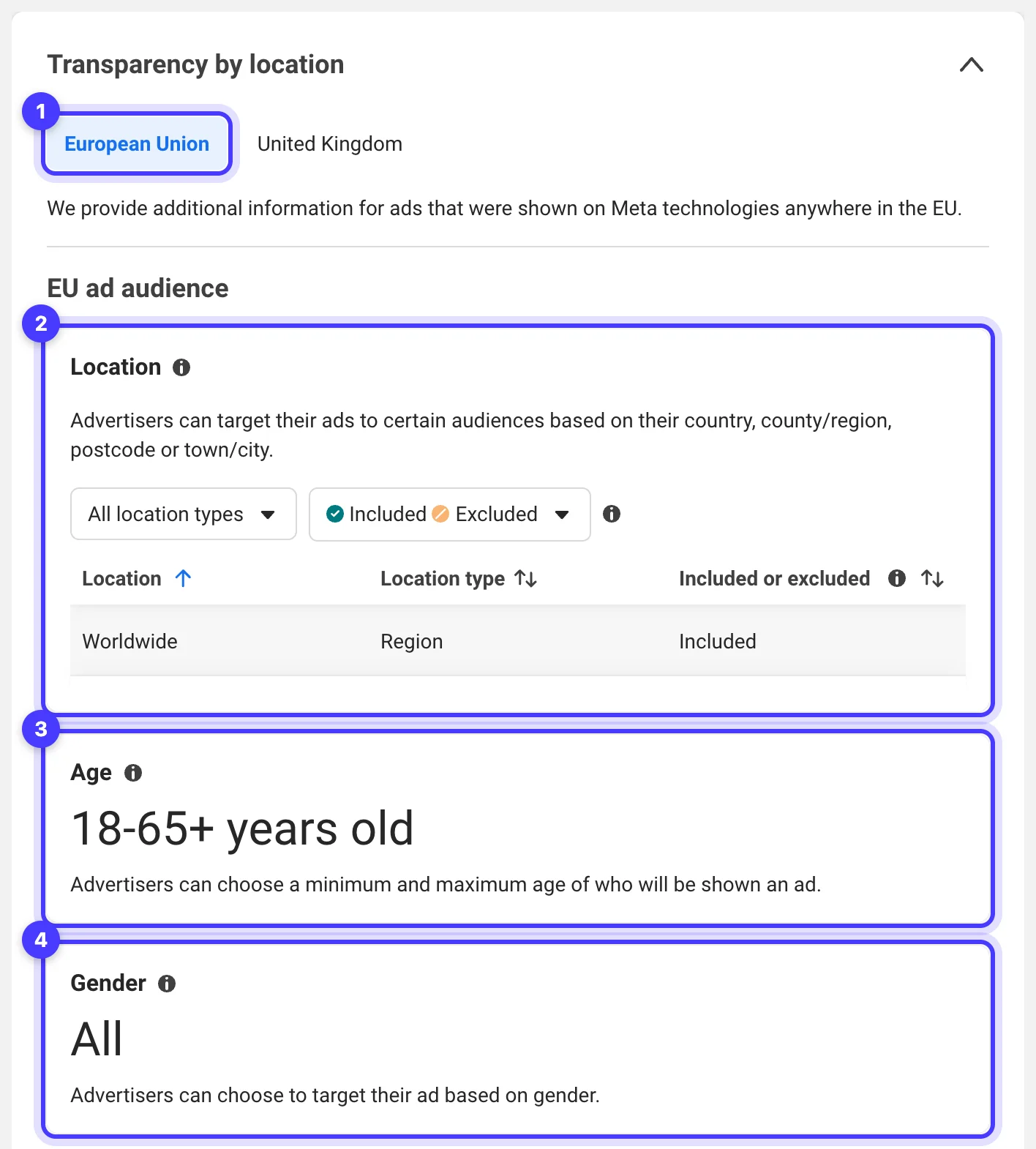
Spend ranges appear only for ads about social issues, elections or politics, which need authorisation in Australia. A retailer's sale ads are not among them.
The nearest thing to performance data is the Sort menu on keyword results. Search the brand's name, set the Advertiser filter to their Page and sort by Impressions: high to low. The ads come back in order of impressions, with no numbers attached. Impressions follow budget, so the top of that list shows where a competitor is putting money. Whether the money comes back stays invisible.
What you can reasonably infer, and how much weight to give it
Everything below is inference from public ads. We log it as an observation, never as a figure.
| Signal | How we read it | What can mislead |
|---|---|---|
| Launch cadence | Ads with a Started running date in the last 7 days | Some brands launch a month of work in one day, so read it over several weeks |
| Versions tested | The version count in See ad details: headlines, copy and formats behind one ad | Versions that differ only by product are a catalogue feed, not a test |
| What stays live | Ads that keep running while others come and go | Runtime alone can mislead: an ad can stay live because it is cheap retargeting, brand activity, a small market or simply forgotten |
| Offers | Discount depth, bundles, shipping thresholds, gifts with purchase, and their timing | One ad's offer can be a test on a slice of traffic |
| Landing pages | Product page, collection, landing page, quiz or lead form for cold traffic | Versions of one ad can point to different pages |
| Target audience | Who appears, the problem named, the language, any UTM tags in the link | This shows who the ad is written for. Meta's delivery decides who sees it |
| Scale | Active ad count, and what tops Impressions: high to low | 200 catalogue ads can cost less than six videos |
A quarter of weekly entries shows which concepts a competitor keeps funding and which offers return every sale. Our guide to finding winning Facebook ads covers which longevity signals hold up, and custom landing pages for Meta and Google ads covers when a dedicated page is worth building.
Our weekly competitor check: what we record for each competitor
Once a week, on the same day, with the country set to Australia, for each competitor:
- Open every Page and handle on their account list, and add any new one.
- Record the number of active ads.
- List the new ads (Started running since last week), saved with Library ID and a screenshot.
- List the stopped ads: anything in last week's entry that has gone. Only your log can show this.
- Note the longest-running live ad and its start date.
- Note the top three under Impressions: high to low.
- Record offers and price points, with the exact wording of any discount.
- Click through each new ad and record the landing page URL and type.
- Tag formats and hooks (founder to camera, creator review, demonstration, before and after, static offer) and any new creator.
- Open Transparency by location on any ad with the EU transparency label.
- Write one line under What changed and, if it is worth acting on, one under Test idea.
We watch three to five direct competitors and two or three adjacent brands selling to the same customer in another category. The adjacent brands tend to supply the better ideas, because your direct competitors read the same library you do. Before big sale periods, plan your own timing with our campaign and offer launch calendar.
Worked example: a one-page competitor log
An invented example for a skincare competitor, filled in the way we fill ours.
| Field | Entry for this week |
|---|---|
| Competitor | A skincare competitor: direct, sells in Australia and the UK |
| Accounts checked | Main Page, its Instagram account, a body care sub-brand Page, the founder's Instagram (new, found by domain search) |
| Active ads | 44, up from 38 |
| New ads | 9: six videos (five from one shoot) and three statics |
| Stopped ads | 3 statics, all carrying 20% off |
| Longest-running live ad | Founder to camera on the barrier cream, live since March |
| Top three by impressions | Two creator reviews of the barrier cream, one before and after on redness |
| Offers | Gift with purchase over $90 (new). Free shipping over $60. 20% off gone. |
| Landing pages | New skin quiz for the gift offer. Creator ads go to the barrier cream product page. |
| Formats and hooks | Four new ads open on redness after cleansing, in a text overlay. Two new creators. |
| EU transparency | UK creator ads target women 25 to 54 |
| What changed | Discount replaced by a gift with purchase. More weight behind one hero product. |
| Test idea | Gift with purchase against our 15% off |
By the third entry you can see whether the gift offer survived or quietly went back to 20% off.
See the decisions behind real ads.
46 ad breakdowns and 17 landing pages, each with the next test it suggests.
How we track competitors in Adspo
The free library answers what is live today. The log needs what changed, and doing that by hand across more than 20 client brands stopped being workable. We use Adspo, a library of Facebook and Instagram ads made by an Australian company, set up the same way for every brand:
- One workspace per client brand, following its direct competitors and adjacent brands, with boards per theme or month.
- Alerts when a followed brand launches a new ad, a creative starts scaling or a new landing page appears. Steps 3 and 8 of the weekly check arrive on their own, and step 4 is a filter for inactive ads.
- Creative-level tracking. Each unique image or video appears once with its lifespan from launch to turn-off, where the Meta Ad Library shows a card per version, so a count of new concepts is a real count.
- Impressions rank. Each creative's rank within the brand's account (1 is its most-served creative) and its impression history show what a competitor is scaling now. The rank is relative within one brand and says nothing about spend or profit.
- Landing pages listed against each creative, so nobody clicks through every ad.
- Boards, including a persona board of 20 distinct ads per client persona and a seasonal board before big sales. Shared boards open without an account, so clients see the references we brief from.
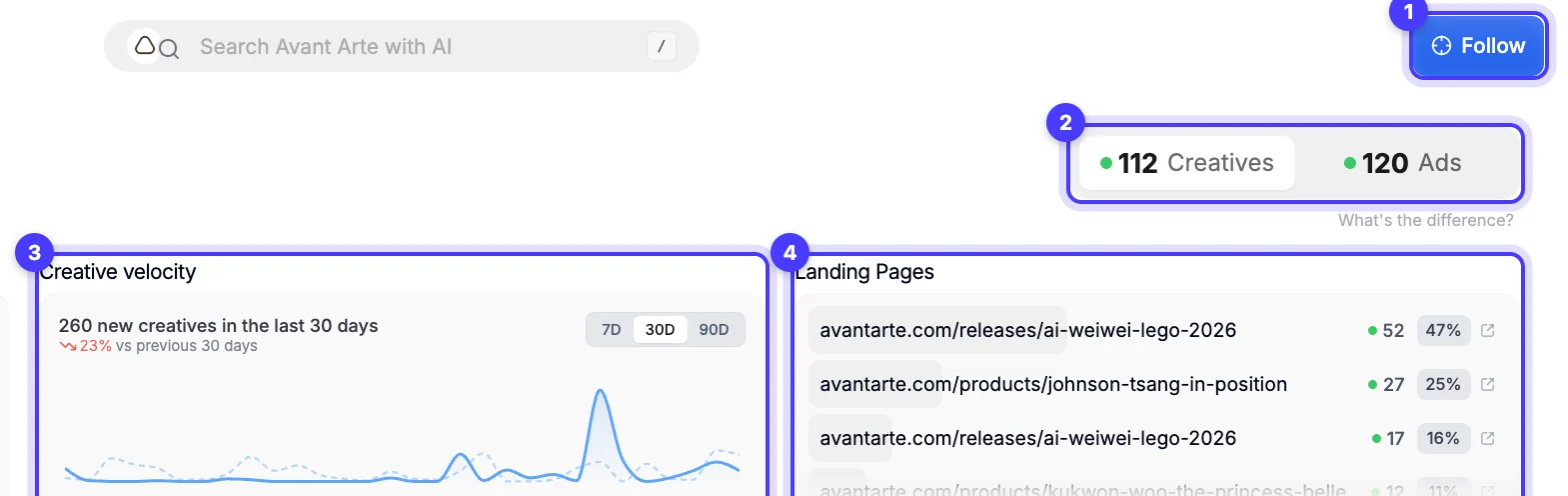
Where it falls short: Meta ads only (no Google, TikTok or YouTube), and a library weighted to ecommerce and DTC brands. Local trade and service categories are thin: we searched skip bins, rubbish removal, junk removal and plant hire by name and domain and found nothing, so for those clients we work the Meta Ad Library directly. Like every ad library, it shows what brands run, never their sales, ROAS or budget.
Pro is US$29 a month, or US$19 a month billed yearly, with a 7-day trial on monthly billing and 14 days on yearly. For one or two competitors checked monthly, the free library will do. For a weekly log across several brands, an Adspo trial shows quickly whether the alerts replace your manual check. Our Adspo review covers the rest of the tool.
Turning competitor observations into tests
We take the pattern, never the ad. Your test says it with your own product, proof and customer language, and never reproduces another brand's asset, claim or distinctive wording. This template comes from our Meta Ads strategy guide, filled in from the example log:
| Field | From the example log |
|---|---|
| Observed pattern | 20% off replaced by a gift with purchase over $90, and creator reviews of one hero product top the impressions sort |
| Customer tension | Buyers want a reason to order now, and constant discounting cheapens a skincare brand |
| Our hypothesis | A gift set just above our average order value holds conversion rate and lifts order value without the margin cost of 15% off |
| Original execution | A travel size of our own bestseller as the gift, in a founder demonstration filmed by our team, linking to a dedicated offer page |
| Proof | Our own customer reviews of that product |
| Decision metric | Contribution margin per order and cost per purchase against the 15% off control over two weeks |
One observation, one test. Write the test name back against the competitor entry so you can see which observations turn into wins. Our weekly paid creative system shows where these tests fit in a production week, and how many ad creatives to test sets the volume. If you would rather hand the log and the testing to us, it is part of our Meta ads management.
Questions we get about seeing competitors' ads
Can you see how much a competitor spends on Facebook ads?
Not for ordinary commercial ads in Australia. The Meta Ad Library shows spend ranges only for ads about social issues, elections or politics. Active ad count, launch cadence and the Impressions: high to low sort show relative effort, and none of them is a budget figure.
Can you see a competitor's Facebook ad target audience?
Only for ads that delivered to the UK or EU, where the Ad Library shows age, gender and location choices and reach in those markets. For ads shown only in Australia, read the audience from the people in the ad, the problem it names, its language and its landing page.
How do I see a competitor's Instagram ads?
Search their name in the Meta Ad Library, pick their Page from the Advertisers list and set Platform to Instagram under Filters. Or open their Instagram profile, tap the menu, choose About this account and look under Active ads. Search their @handle too, since a business can boost from Instagram without a Facebook Page.
How do I check a competitor's Facebook ads performance?
You cannot see it directly. No ad library shows another brand's sales, clicks, cost per result or ROAS. Runtime, version count and the impressions sort are the best public signals, and runtime can mislead: an ad can stay live because it is cheap retargeting or simply forgotten.
Can I see a competitor's old or inactive ads?
Ordinary commercial ads leave the Meta Ad Library when they stop. Ads that delivered to the UK or EU stay for one year after their last impression, and ads about social issues, elections or politics stay for seven years. Log everything else weekly, or use a tool that records launch and turn-off dates.
How often should I check competitor ads?
Weekly, on the same day, with the same country setting. A monthly check misses ads that launch and stop in between, and those are your record of what the competitor tried and dropped.
Sources
- Meta Business Help Centre: About the Meta Ad Library
- Meta Ad Library
- Instagram Help Centre: How do I view an account's active ads on Instagram?
- Instagram Help Centre: About Meta ad account options for ads on Instagram
- Facebook Help Centre: About Page transparency
- Adspo: features and pricing
Disclosure: Hey Sage uses Adspo for client work and earns a referral fee when you subscribe through our Adspo links.