
On this page
- 01 · What an ad swipe file is for, and what belongs in it
- 02 · The structure we use: one space per brand, boards by job
- 03 · Persona boards: 20 distinct ads per persona
- 04 · The note on every save, as a template you can copy
- 05 · Search by problem, not by brand
- 06 · Seasonal boards, built before the sale
- 07 · How a board becomes a brief and a test
- 08 · Keeping the swipe file alive
- 09 · Swipe file tools: Adspo, the Meta Ad Library or a spreadsheet
- 10 · Questions we get about ad swipe files
- 11 · Sources
What an ad swipe file is for, and what belongs in it
An ad swipe file is a saved collection of other brands' ads, organised so your team can brief new tests from it. Build it as one space per brand with boards for personas, direct competitors, adjacent categories, formats and seasons, and attach a short note to every save: the pattern it shows, the customer tension behind it and the test it suggests. Cap each persona board at 20 distinct ads. If a save cannot become a brief, it does not belong in the file.
Call it a creative swipe file or an ad inspiration library; what separates it from a mood board is the job. A mood board collects a look. A swipe file collects evidence for a hypothesis: this opening line stops this customer, this proof sequence answers this objection. The strategist, the editor and the client all read it, so every save has to make sense to someone who was not there when it was saved.
What belongs in it:
- Ads that show a pattern you could test: a first-frame device, an objection handled, a proof sequence, a creator role, an offer framing.
- Your own best ads, so new work builds on what already earned results.
- Ads from other categories that solve the same customer problem.
- Format references that show an editor exactly what the brief means.
What stays out: ads saved because they look good, near-duplicates and any save without a note.
The structure we use: one space per brand, boards by job
We run our swipe files in Adspo, with one workspace (Adspo calls them spaces) per client brand, more than 20 of them. Each space follows the brand's direct competitors and adjacent brands, and holds boards organised by the job each one does:
| Board | What goes in it | What we use it for |
|---|---|---|
| One per persona, in a Personas folder | 20 distinct ads that hit that persona's pain point, no more than two from the brand itself | Briefing new concepts for that persona |
| Direct competitors | The strongest saves from each brand you sell against | Seeing which claims, offers and formats they keep running |
| Adjacent categories | Brands selling to the same customer, or solving the same problem with a different product | Hooks and proof devices your own category has not worn out |
| Formats | References by execution: talking head, UGC, before and after, us vs them, static offer | Showing an editor or creator what the brief means |
| Seasons | One board per sale period, such as Black Friday, Boxing Day or EOFY | Offer framing and urgency, built before the brief is due |
Name boards so anyone can find them: "Persona: replacing peeling pans", never "Inspo 3". Boards for a month or theme sit alongside when a campaign needs its own.
Persona boards live in a Personas folder in each brand's space. Adspo boards can be shared with a public link that needs no account, so we embed each shared persona board in the client's Hey Sage portal next to that persona. The client sees the exact references we brief from.

Run Better Ads. The free guide + vault.
137 pages on ecommerce ads, with 46 real ads and 17 landing pages taken apart.
Persona boards: 20 distinct ads per persona
A persona, for us, is a specific situation with one focused pain point, not a demographic. "Women 25 to 44" gives a creative team nothing to brief. "Cooks most nights and has thrown out two peeling non-stick pans in three years" does, and it is our worked example for the rest of this guide. Our persona ad set structure explains how personas map to ad sets; the board is where each persona's creative references live.
For each persona we curate a board of 20 distinct ads, under these rules:
- Two from the brand itself, at most. The board exists to bring in ideas the brand has not used yet.
- Search outside the category. When another category shows the same problem being solved, its ads qualify. For the pan persona, a food storage ad that opens on a stained, warped plastic tub going in the bin hits the same frustration with things that wear out too soon.
- Record the exact matching moment. Every ad has to show the overlay text, voiceover line or demonstration that hits the persona's pain, and the note says where it is (for example, "0:03, overlay: third one this year"). Who the advertiser is, or a similar visual mood, never qualifies an ad on its own.
- No near-duplicates. The same footage with a shorter script or a lightly changed hook is one concept. Keep the clearest version and drop the rest.
- Check the language. For English-language boards we keep ads with English messaging or a demonstration that works without words. Watch the creative itself before saving: a transcript can be attached to the wrong video, and the moment you are saving has to be in the ad.
- Stop at 20. That is enough range to brief several concepts and short enough to review in one sitting. A better find replaces the weakest ad.
The note on every save, as a template you can copy
The note is what makes a save briefable. Ours uses the fields from the "turn an inspiration save into a test" template in our Meta ads strategy guide, plus format and source. Adspo keeps the creative, copy, transcript and run dates with each save; keep the note in a log beside the board, one row per save. If you save ads by hand, the same columns make a complete swipe file template in a spreadsheet or Notion database.
| Column | What to write | Worked example: the pan persona |
|---|---|---|
| Saved | Date, and who saved it | 13 Nov 2026, strategist |
| Board | Persona, competitor, adjacent, format or season | Persona: replacing peeling pans |
| Source | Brand, plus the Adspo link or the Meta Ad Library ID and start date | Adjacent food storage brand, Adspo link |
| Format | The execution in a few words | UGC, hands only |
| Matching moment | Timestamp and the exact line, overlay or demonstration | 0:03, overlay "third one this year" over a warped tub going in the bin |
| Observed pattern | What repeats across ads like this | Opens on the worn-out old product being thrown away |
| Customer tension | Why it may matter to this persona | Feels cheated by pans that peel within a year |
| Our hypothesis | What we believe and will test | Opening on a binned, peeling pan stops replacers faster than a product beauty shot |
| Original execution | How we will express it without copying | Founder bins three of the team's own worn pans, then shows our pan after a year of daily use |
| Proof | What makes it credible | Warranty terms on screen and the year-old pan shown up close |
| Decision metric | The commercial outcome that decides it | Cost per purchase against the current best ad, once it has spent three times the target CPA |
| Status | New, briefed, testing or retired, with the result | Briefed as concept 14 |
Write the note when you save; a week later nobody remembers why the ad mattered. It also keeps the team honest about what it takes: the pattern, never the ad. Never reproduce another brand's footage, claim or distinctive line.
Search by problem, not by brand
Following competitors fills the first half of a board quickly, then the matches dry up. That is when we switch to searching the customer's problem. Adspo's keyword search covers ad copy, video transcripts and text in the image, so a phrase a customer would say finds ads from brands you would never have thought to follow.
- List the phrases the persona would use about the problem: "non-stick peeling", "coating flaking", "replace my pans".
- Search each phrase, then use the industry filter to cut unrelated meanings ("peeling" also pulls in skincare).
- Run the best phrase once more without filters before deciding nothing exists. Filters hide adjacent categories, which is where the useful outside-category ads come from.
- Scroll past the first screen of results, then sort by newest, longest running and total ad count. Each sort brings up a different set.
- To find an execution rather than a message, browse by visual format (talking head, UGC, before and after, us vs them) instead of keywords.
The free Meta Ad Library also has a keyword search, returning ads that contain the term and ads from Pages whose names contain it. It is fine for checking one phrase in Australia; for a 20-ad board drawn from many categories, transcript search and boards do most of the work.
Runtime, ad count and an impressions rank of 1 (the brand's most-served creative) are research signals, never proof of profit: an ad can stay live because it is cheap retargeting, brand activity, a small market or simply forgotten. We also run these searches through Adspo's connector in Claude, which reads copy and transcripts back and checks a board before we brief; researching ads with Claude covers that set-up.
See the decisions behind real ads.
46 ad breakdowns and 17 landing pages, each with the next test it suggests.
Seasonal boards, built before the sale
Before each big sale period we build a board for each brand, for example a Black Friday board, and top it up with around 50 curated ads from competitors and adjacent categories. In Australia that means EOFY in June, Father's Day in September, Black Friday and Cyber Monday, Boxing Day, and Mother's Day in May.
The board has to exist before the creative brief is due, usually weeks before the sale. Reverse-plan that date with our campaign and offer launch calendar, and set budgets and phases with the BFCM budget and launch plan. Organise the board by phase: teaser, launch, last call. We look at offer framing (percentage off, dollar amount, gift with purchase, bundle), the urgency device and how a brand keeps its look under a discount.
Save during this year's sale for next year's board. Apart from political ads and ads that reached the UK or EU (archived for a year after their last impression), the Meta Ad Library shows active ads only, so an Australian brand's Black Friday ads vanish from it once switched off. Adspo keeps inactive ads with their launch and turn-off dates, so last year's sale stays searchable.
How a board becomes a brief and a test
- Read the notes, not the thumbnails. Group saves that share a customer tension; three or four pointing at the same tension make one concept.
- Write one hypothesis per concept, so the result is readable.
- Brief the original execution. The brief carries the hypothesis, the board link with the matching moments called out, the proof, the format and the decision metric. It also names what must not be copied from the references.
- Add variations: different hooks or openings, so a weak first frame does not kill a good idea. Our guide to how many ad creatives to test sets the volume.
- Fund it to a decision. The creative testing pipeline planner turns your test budget, target CPA and production capacity into how many concepts you can test properly.
- Write the result back on the save, so the next brief starts from what the last test taught.
Our weekly paid creative system runs this as a weekly rhythm from research to brief to review. If you would rather hand the research, briefing and testing to us, that is part of our Meta ads management.
Keeping the swipe file alive
Competitors change their offers, personas shift and tested patterns stop being new. The cadence we keep:
- Every brief: add the saves you found while researching, each with its note. A save without a note gets deleted at the next prune.
- Monthly: prune near-duplicates, saves that no longer show a matching moment, and anything nobody can explain. Retire patterns you have tested to an archive board with the result, so nobody briefs the same test twice.
- Quarterly, or when a persona changes: rebuild each persona board to 20 distinct ads, check the own-brand cap and confirm outside-category ads are still on it.
- After each sale: label the seasonal board with the year and start next year's board from it.
- Trends: date any format that is everywhere this month, and retire it when it stops feeling new.
Swipe file tools: Adspo, the Meta Ad Library or a spreadsheet
| Tool | What it saves | Where it fits | Limits |
|---|---|---|---|
| Meta Ad Library (free) | Nothing: no save button, boards or notes. You can copy each ad's Library ID and start date by hand | Checking one competitor or phrase across every active ad on Meta's apps | Ads that ran only in Australia vanish once switched off |
| Adspo (US$29 a month, or US$19 a month billed yearly) | Boards you can copy, download and share by public link, in separate client workspaces | Boards across many brands, with transcript search, format tags and inactive ads kept | Meta ads only; thin on local trade and service categories |
| Spreadsheet or Notion database | Whatever you paste in: links, screenshots and the note columns above | A few saves a week, or categories Adspo does not cover | All manual; keep a screenshot or recording, because Australian ads leave the Meta Ad Library when they end |
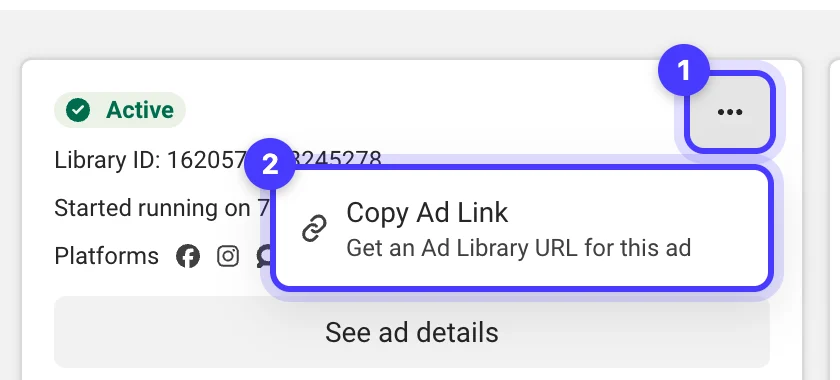
If you research one or two competitors a month, the Meta Ad Library plus a spreadsheet with the columns above does the job. Adspo is worth paying for when you build persona boards across several brands or share references with clients. It tracks ads at the creative level: each unique image or video appears once, with its lifespan from launch to turn-off.
Adspo covers Meta (Facebook and Instagram) ads only, with no Google, TikTok or YouTube, and its library leans to ecommerce and DTC brands: when we searched skip bins, rubbish removal, junk removal and plant hire by name and domain we found nothing, so for local trade and service businesses we work the Meta Ad Library directly. Prices are in US dollars. An Adspo trial runs 7 days on the monthly plan or 14 days on the yearly plan, with a 7-day money-back guarantee, and extra team seats cost US$15 a month (US$10 billed yearly). Our Adspo review covers the rest of the tool, and Facebook Ad Library alternatives compares the other options.
Questions we get about ad swipe files
What is an ad swipe file?
A saved, organised collection of other brands' ads that your team briefs new ad tests from. A useful one groups ads by persona, competitor, adjacent category, format and season, with a note on every save.
How do you create a swipe file for ads?
Set up one space per brand with boards for each persona, direct competitors, adjacent categories, formats and sale periods. Fill each persona board with 20 distinct ads that show the moment hitting that persona's pain, and note the pattern, customer tension, hypothesis, original execution, proof, decision metric, format and source.
Can you save ads from the Facebook Ad Library?
Not inside the library. The Meta Ad Library has no save button, boards or notes. You can copy an ad's Library ID and start date into a spreadsheet, but ads that ran only in Australia drop out of the library once they stop, so keep a screenshot or recording as well, or save them in a tool such as Adspo that keeps inactive ads.
What is the best swipe file app for ads?
For Facebook and Instagram ads we use Adspo: boards share by public link, each client gets a workspace and it searches video transcripts. It costs US$29 a month, or US$19 a month billed yearly, and is thin on local service categories. For a few saves a month, a spreadsheet or Notion database works.
Is there a swipe file template I can copy?
Use these columns in a spreadsheet or Notion database: saved, board, source, format, matching moment, observed pattern, customer tension, our hypothesis, original execution, proof, decision metric and status. The table in this guide shows a worked example for each.
Is it OK to copy ads from a swipe file?
Take the pattern, never the ad. Reproducing another brand's footage, claims, lines or distinctive look is copying, and it tells you nothing about your own customers. Translate the pattern into your own brand, evidence and customer language, then test it.
Sources
- Meta Business Help Centre: About the Meta Ad Library
- Meta Ad Library
- Adspo: boards, workspaces and pricing (adspo.co)
Disclosure: Hey Sage uses Adspo for client work and earns a referral fee when you subscribe through our Adspo links.