
On this page
- 01 · How to search the Facebook Ad Library from Australia
- 02 · Keyword, exact phrase or advertiser: the three ways to search
- 03 · Filters and sort: what each option does
- 04 · How to read an ad card
- 05 · What an Australian ad shows, compared with one that ran in the EU or UK
- 06 · Political and social issue ads in Australia: authorisation, disclaimers and the report
- 07 · Facebook Ad Library not showing ads or not working: what to check
- 08 · Where the free library stops, and how we fill the gap
- 09 · Questions we get about the Meta Ad Library in Australia
- 10 · Sources
How to search the Facebook Ad Library from Australia
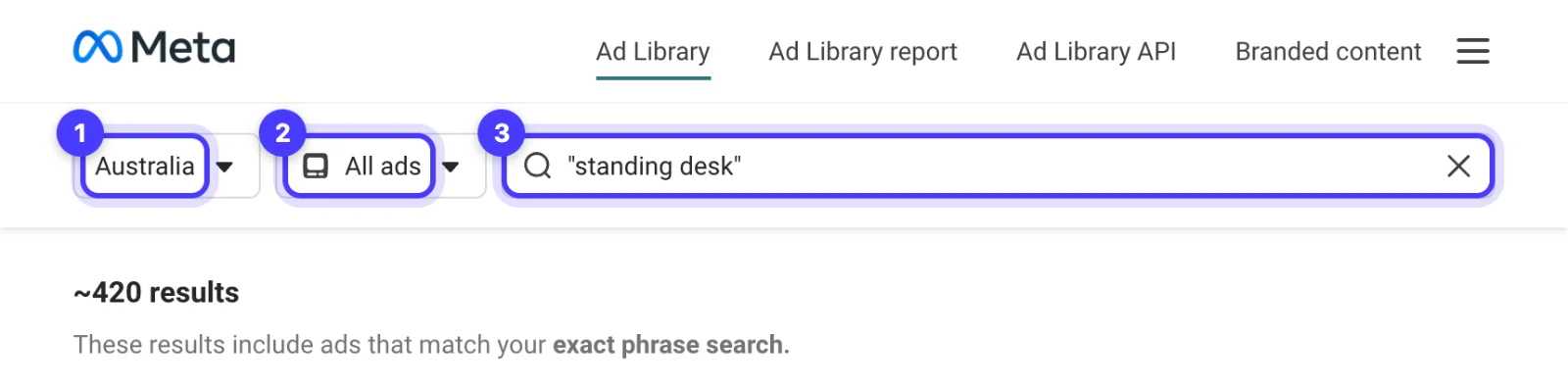
Go to facebook.com/ads/library. You do not need a Facebook account. Set the location box to Australia, set Ad category to All ads, then type a keyword, or start typing a brand name and pick its Page from the Advertisers list. Put a phrase in quotation marks to match it exactly, and use Filters to narrow by platform, media type, active status and date.
For an ad that ran only in Australia, the library shows the creative, the copy, the start date and the platforms while the ad is live. It shows no spend, reach or targeting, and the ad drops out of the library once it stops. Ads that also reached the EU or UK, and ads about social issues, elections or politics, stay longer and show more.
We use the free library every week for client work, and it is the right tool for a quick look at what one brand is running now. When the job needs history, saved references or alerts, we work in Adspo, covered at the end.
Keyword, exact phrase or advertiser: the three ways to search
The search box stays greyed out, reading Choose an ad category, until you pick a category. Once you do, it reads Search by keyword or advertiser and works three ways.
Keyword search
Type words and press Enter. Meta returns ads containing all of those words in any order, plus ads run by Pages whose name includes them. Search the words a customer would see in an ad rather than category jargon: a problem (back pain), an offer (free shipping) or a product type (sit stand desk). It is how you find brands you did not know were advertising in your space.
Exact phrase search
Wrap the phrase in quotation marks: "standing desk" matches those words in that order. You can put more than one quoted phrase in one search, and the dropdown offers Search this exact phrase as you type.
Advertiser search
Start typing a brand name and wait for the Advertisers list. Each entry shows the Page name, its handle, follower count, Page category and the linked Instagram account. Several Pages often share a name, so match the handle and follower count before you click. Choosing a Page opens two tabs: Ads, and About, with the Page's creation date, name changes, the organisation responsible and the countries its managers are in.
Two other routes: on a Facebook Page, About then Page transparency shows whether the Page is currently running ads (Facebook asks you to log in before it shows more), and on Instagram, logged in, the profile menu's About this account lists Active ads. Finding every Page and Instagram account a competitor advertises from is covered in how to see your competitors' Facebook ads.

Run Better Ads. The free guide + vault.
137 pages on ecommerce ads, with 46 real ads and 17 landing pages taken apart.
Filters and sort: what each option does
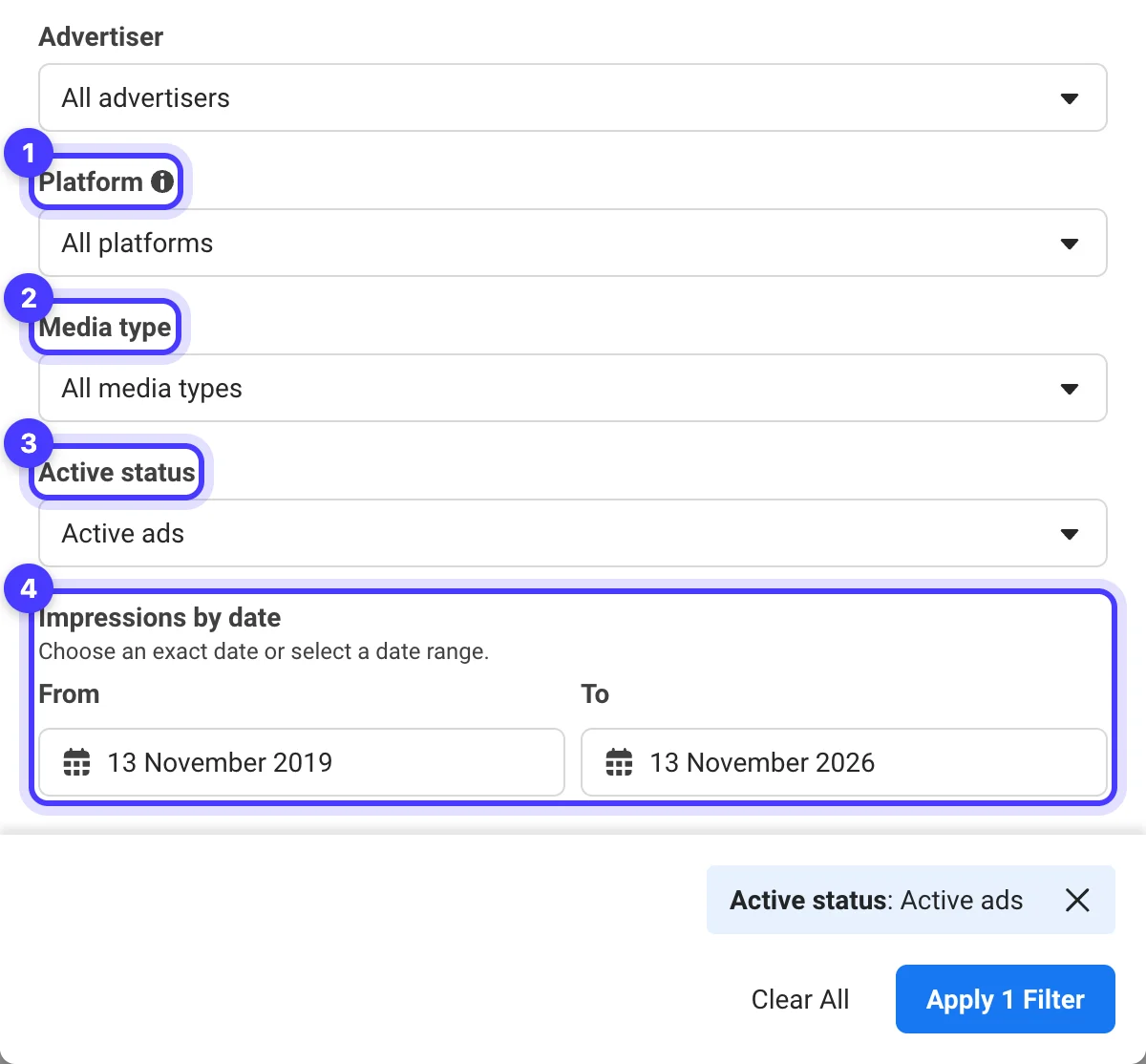
Click Filters above the results. Each filter you apply appears as a chip under the results count with a Remove link, and Clear All in the panel resets the lot.
| Filter | Options | When we use it |
|---|---|---|
| Language | The languages found in your results | Cutting foreign-language ads out of a broad keyword search |
| Advertiser | The Pages in your current results | Narrowing a keyword search to one brand |
| Platform | Facebook, Instagram, Audience Network, Messenger, WhatsApp, Threads | Checking whether a brand runs anything outside Facebook and Instagram |
| Media type | Images, Images with little to no text, Memes, Images and memes, Videos, No image or video | Pulling only video references before a shoot |
| Active status | Active and inactive, Active ads, Inactive ads | Inactive only returns ads Meta archives (see below) |
| Impressions by date | A From and To date | Seeing which live ads delivered during a launch or sale week |
With a keyword search running, Media type adds two options tied to your search term: Images with text and Keyword within video transcript or ad copy. Use them to find ads where the phrase sits on the image or in the voiceover.
Sort by offers Impressions: high to low and Most recent. Meta shows no impression figures for Australian commercial ads beyond a Low impression count label (Impressions: under 100) on ads that have barely run, but the first option puts the most-served ads at the top, a signal you never see as a number. Result counts are approximate.
How to read an ad card
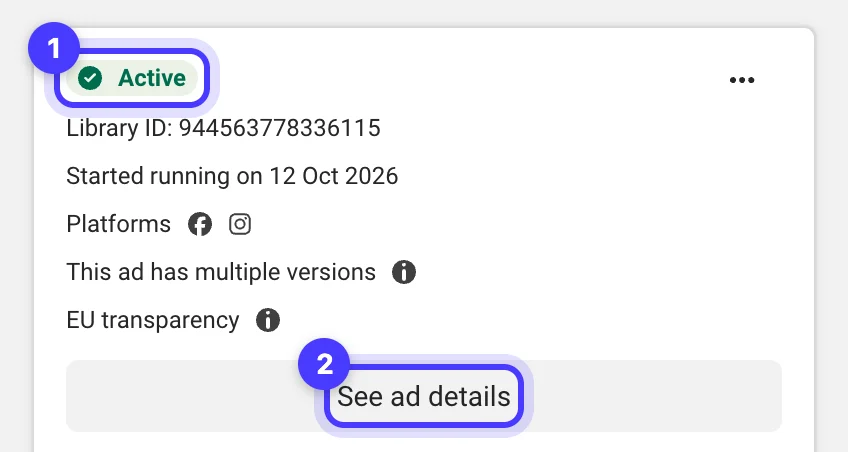
- Active or Inactive, then the Library ID, the ad's unique ID. The card's menu has Copy Ad Link; we paste these links into briefs so everyone looks at the same ad.
- Started running on is the date the ad first appeared on Meta's apps. Inactive cards show a date range instead. Total active time can appear on both, and on new active ads it counts in hours. Meta records Ad Library dates in Pacific Time, so a start date can read a day earlier than it was in Melbourne.
- Platforms shows icons for where the ad was shown.
- This ad has multiple versions means one Library ID holds several versions of the creative or copy. Open See ad details and page through them (1 of 4, 2 of 4).
- 10 ads use this creative and text, with See summary details, means Meta has grouped separate ads that reuse the same image or video and the same text, usually across campaigns with different start dates, locations or budgets.
- EU transparency means the ad delivered in the EU or UK and carries extra data: open See ad details and look for the Transparency by location section, with European Union and United Kingdom tabs (next section).
- See ad details opens the full ad with an About the advertiser panel.
New ads appear within 24 hours of their first impression, and edits show within 24 hours.
The card is silent on spend and on profit. An ad with a start date months back is still running; it can be cheap retargeting, a small audience or something nobody has switched off. How we weigh runtime against other signals is in how to find winning Facebook ads.
What an Australian ad shows, compared with one that ran in the EU or UK
What you see depends on where an ad delivered, not where the advertiser is based.
| Ad | How long it stays | What you can see |
|---|---|---|
| Commercial ad that delivered in Australia and nowhere in the EU or UK | While active only | Creative, copy, start date, platforms and the advertiser's Page details. No spend, reach or targeting |
| Ad that delivered an impression in the EU or associated territories | While active, then one year after its last impression | Dates it ran; the advertiser's age, gender and location targeting, including exclusions; total EU reach; reach by targeted location split by age and gender; advertiser and payer details |
| Ad that delivered in the UK (ads that ran after 1 July 2025) | While active, then one year after its last impression | The same targeting and reach data for the UK, without advertiser and payer details |
| Ad about social issues, elections or politics | Seven years, active or inactive | Spend and impressions as ranges, age and gender split, locations, estimated audience size and the Paid for by disclaimer |
The European data covers European delivery only: an Australian brand that also sells into the UK shows its UK reach and targeting, never its Australian numbers.
Worked example from our own search on 13 November 2026: "standing desk" in quotes, Australia, All ads. Active ads returned about 430 results. Switching Active status to Active and inactive returned about 5,300. By Meta's rules an inactive ad stays only if it ran in the EU or UK or is about social issues, elections or politics, and many of those cards carried the EU transparency label. A local competitor's ads from last month's sale are gone, so screenshot anything you want to keep.
See the decisions behind real ads.
46 ad breakdowns and 17 landing pages, each with the next test it suggests.
Political and social issue ads in Australia: authorisation, disclaimers and the report
Australia is on Meta's list of countries where ads about social issues, elections or politics need authorisation and a disclaimer, along with Christmas Island, the Cocos (Keeling) Islands, Heard Island and McDonald Islands, and Norfolk Island. The social issues part catches brands as well as parties: Meta's top-level social issues for Australia include health, the economy, education, crime, immigration, civil and social rights and environmental politics, and its policy names brands among the advertisers that must be authorised when an ad takes a stand on one of them.
What authorisation involves
- You must be an admin or advertiser on the Page running the ads, with two-factor authentication on. Turning two-factor off later disables your disclaimers and ads and revokes the authorisation.
- You confirm your identity with one government ID or two non-government IDs issued by the country you are targeting, or a notarised form.
- ID checks take up to 48 hours, disclaimer reviews usually 24 hours, and the ads themselves up to 72 hours.
- The ads carry a Paid for by disclaimer naming the person or organisation responsible. Meta adds the words Paid for by itself, so the disclaimer must not repeat them, and the disclaimer's location must match the country you target.
Disclaimer details stay in the Ad Library for seven years; you can mask your street address and postcode.
Searching these ads
Set Ad category to Issues, elections or politics. These ads stay searchable for seven years whether active or not, and the filters add disclaimer, delivery by region and estimated audience size. See ad details shows spend and impressions as ranges, the age and gender split, locations and the disclaimer.
The Ad Library Report for Australia
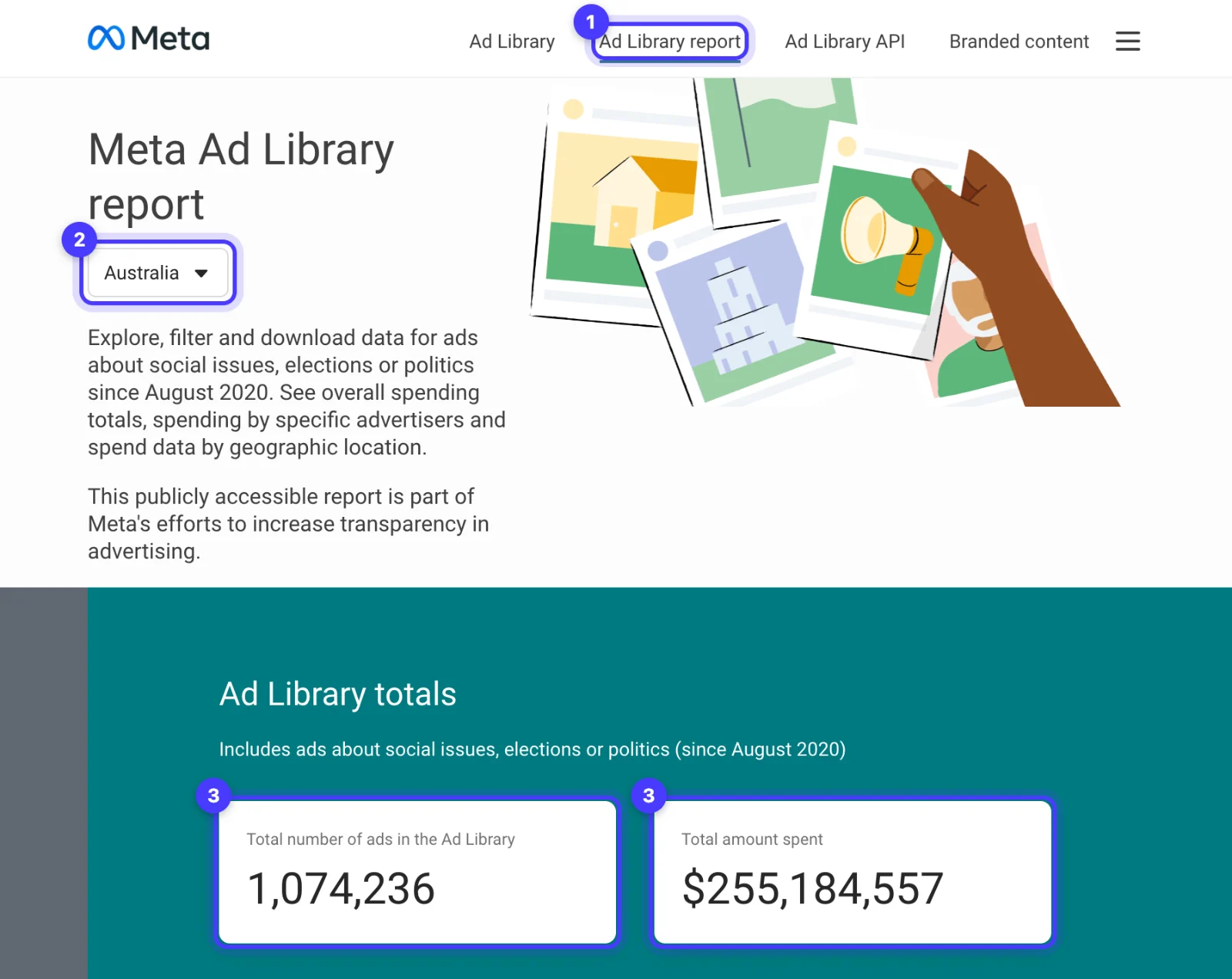
The Ad Library report link at the top of the library opens Meta's report for these ads, which covers Australia from August 2020. It shows total ads and spend, Spending by advertiser (Page name, disclaimer, amount spent and number of ads), Spending by location across the states and territories, date ranges from the last day to all dates, and a CSV download with an end date inside the latest seven days. Ordinary commercial ads are not in it.
Facebook Ad Library not showing ads or not working: what to check
Work down this list. Most cases we see are a setting.
- The search box is greyed out. Choose an Ad category first. The box reads Choose an ad category until you do.
- The country is wrong. The location box limits results to ads that ran in that country. Set Australia for ads you saw here, or All to see a brand's ads everywhere.
- The category is wrong. Issues, elections or politics leaves out ordinary commercial ads. Switch to All ads.
- The ad has stopped. An Australian commercial ad leaves the library when it stops running, and nothing brings it back.
- The ad is brand new. Ads appear within 24 hours of their first impression.
- You picked the wrong Page. Check the handle and follower count in the Advertisers list, and look for a second Page: some brands advertise from more than one.
- Filters are stacked. Look for chips under the results count, such as Active status: Active ads, and remove them, or open Filters and click Clear All. Searches start on Active ads by default.
- The creative is blank. Ads with age-restricted content such as alcohol or gambling hide their creative from anyone underage or not logged in to Facebook. Log in with an adult account.
- The ad was removed. Meta takes ads out of the library in limited cases, such as serious Community Standards violations or a valid government request.
Where the free library stops, and how we fill the gap
The free library is enough when you want to see what one brand is running in Australia today, check a competitor's offer before a sale, or look up political and social issue spending. It is also where Meta publishes EU and UK reach and targeting data. It stops in four places:
- No memory. Australian commercial ads disappear when they stop, so a local competitor's Black Friday ads from last year are gone unless they also ran in Europe.
- No saving. You can copy an ad link, but there are no boards, notes or alerts.
- Repeats. Meta groups ads only when the creative and the text both match, so the same video run in three separate ads with three captions shows up as three cards.
- No delivery figures. You can sort by impressions but never see them, apart from a Low impression count label on ads that have barely run.
We fill that gap with Adspo, an ad library made by an Australian company that we use every day across more than 20 client workspaces. It tracks Meta ads at the creative level, so each image or video appears once with its lifespan from launch to turn-off, and it shows target countries, transcripts, landing pages and an impressions rank within the brand's own account. We follow each client's competitors, get alerts when they launch or scale a creative, and keep boards of references we brief from. Pro costs US$29 a month billed monthly or US$19 a month billed yearly, with a 7-day free trial on monthly and 14 days on yearly.
It covers Meta only, and its library leans to ecommerce and direct-to-consumer brands: searches for skip bins, rubbish removal and plant hire found nothing, so for local trade and service clients we still work the Meta Ad Library directly. Its impressions rank compares creatives inside one brand's account and says nothing about spend or profit. We compare the options in Facebook Ad Library alternatives. If you would rather hand the research and the ads to us, that is part of our Meta ads management.
Put your own numbers into it.
Acquisition and payback calculators, plus six editable sheets for briefs, tests and feed checks.
Questions we get about the Meta Ad Library in Australia
Do I need a Facebook account to use the Meta Ad Library?
No. Anyone can search facebook.com/ads/library without an account. You need to log in to report an ad or see adult content, and ads for age-restricted products such as alcohol or gambling hide their creative from people who are not logged in.
How do I search the Facebook Ad Library by keyword?
Set the location to Australia and the Ad category to All ads, type your words and press Enter. Meta matches all the words in any order. Put a phrase in quotation marks to match it exactly, for example "free shipping".
Why is the Facebook Ad Library not showing any ads?
Usually a setting. Check that the Ad category is All ads, the country is Australia or All, no filters are stacked under the results count and you picked the right Page. An ad that ran only in Australia leaves the library once it stops.
Can you see inactive ads in the Facebook Ad Library?
Only some. Ads about social issues, elections or politics stay for seven years, and ads that delivered in the EU or UK stay for one year after their last impression. An ordinary commercial ad that ran only in Australia disappears once it stops.
Can I see how much a competitor spends on Facebook ads in Australia?
Not for commercial ads. The Ad Library shows spend only for ads about social issues, elections or politics, as a range, and the Ad Library Report totals that spending by advertiser and by state.
How long does it take for an ad to show up in the Meta Ad Library?
Meta says an ad appears within 24 hours of its first impression, and changes to an ad are reflected within 24 hours.
Sources
- Meta Ad Library (search tips and FAQ)
- Meta Business Help Centre: About the Meta Ad Library
- Meta Business Help Centre: Availability for ads about social issues, elections or politics
- Meta Business Help Centre: Become authorised to run ads about social issues, elections or politics
- Meta Ad Library Report: Australia
- Adspo: Pricing
Disclosure: Hey Sage uses Adspo for client work and earns a referral fee when you subscribe through our Adspo links.