
On this page
- 01 · Can you download videos from the Facebook Ad Library?
- 02 · Why you need a copy at all
- 03 · Step 1: find the video and record its details
- 04 · Step 2: record it with your screen recorder
- 05 · Step 3, if you must: downloader extensions
- 06 · Step 4: download it from Adspo
- 07 · Keep downloads in boards, not a downloads folder
- 08 · Downloading Ad Library data instead of videos
- 09 · What to do with a downloaded ad
- 10 · Questions we get about downloading Ad Library videos
- 11 · Sources
Can you download videos from the Facebook Ad Library?
Not with a button. The Meta Ad Library has no download control on an ad's video or image (we checked the live library on 23 November 2026). Meta's own downloads are a CSV of your Ad Library searches, which needs you logged in to Facebook and agreeing to its terms, and the Ad Library report, which covers spending on ads about social issues, elections or politics.
To keep a video for research you have three routes: record it with your computer's built-in screen recorder, use a downloader extension, or save it in an ad research tool that stores the file. We use Adspo, where every video creative has a Download button and stays on file after the ad stops. Whichever route you pick, the video belongs to the advertiser: keep it for internal reference and briefs, never re-upload it or cut it into your own ads.
Why you need a copy at all
Australian ads leave the Meta Ad Library the day they stop running. The library shows every active ad, but it only archives three groups after they end:
| Ad type | Kept after it stops |
|---|---|
| Ordinary commercial ads shown only in Australia | Not kept |
| Ads delivered to the EU or associated territories | 1 year from the last impression |
| Ads delivered to the United Kingdom | 1 year from the last impression |
| Ads about social issues, elections or politics | 7 years |
So the competitor video you meant to show your editor next week can be gone by then. If an ad matters to a brief, save a copy the day you find it, with its details written down. This matters most before a sale period: our Black Friday ad research guide covers where last year's sale ads still live.

Run Better Ads: our free ecommerce guide
We’ve tracked $700m+ in ad revenue across 200+ brands. See how we work out what a sale can cost and choose which ad to test next.
Step 1: find the video and record its details
Open the Meta Ad Library, set the country to Australia and the ad category to All ads, then search. For ideas around a product or problem, put the phrase in quotes so the search matches it exactly. Open Filters and set Media type to Videos so image ads drop out.
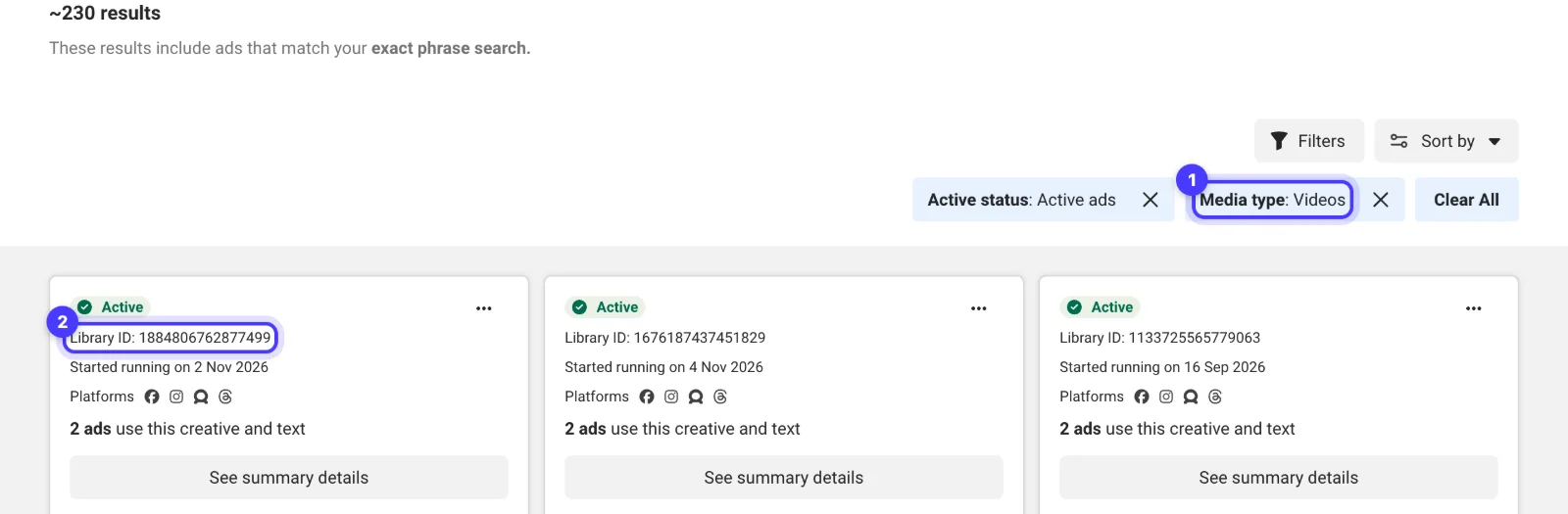
For every ad you keep, write down four things before you save anything:
- Library ID. It appears at the top of each card. The address facebook.com/ads/library/?id= followed by the ID reopens that ad while it is still running.
- Started running date. Australian commercial ads show only the start date, so note it now.
- Copies. A line such as "2 ads use this creative and text" tells you the advertiser is running the same video more than once.
- Why you saved it. The hook, the demonstration or the offer, in one line. A folder of videos with no notes is useless in a month.
Our guide to the Meta Ad Library in Australia covers search settings, filters and what each card shows in more detail.
Step 2: record it with your screen recorder
The safest free route is the screen recorder already on your computer or phone. Nothing to install, and it works on any ad you can play.
- Mac: press Shift, Command and 5, choose Record Selected Portion, drag the box over the video and click Record. Play the ad with sound on, then stop the recording from the menu bar.
- Windows 11: open the Snipping Tool, switch to Record, select the video area and start recording.
- iPhone or Android: start Screen Recording from Control Centre or Quick Settings, open the ad in the Facebook app or the Ad Library in your browser, and play it full screen.
Play the video once from the start before you record so it has buffered and the first seconds are sharp. The hook lives in those seconds. Name the file with the Library ID and date, for example 1234567890123456_2026-11-23.mov, so it always traces back to the ad.
Step 3, if you must: downloader extensions
Search "facebook ad library downloader" and you will find dozens of Chrome extensions that add a download button to each ad card. They work by reading the video file the page loads. Before installing one, check three things:
- Permissions. An extension that can read and change your data on facebook.com can see everything in your logged-in Facebook session, including Business Manager. Install it in a separate browser profile that is not logged in to your ad accounts.
- Publisher. A named company with a website and a privacy policy, recent updates and reviews that mention the Ad Library specifically.
- Who it is for. Free downloaders often exist to collect browsing data. If it asks for an account or payment details just to save a video, close it.
We do not recommend a specific extension. For a few videos a month the screen recorder is enough; for regular research a tool that already stores the files saves the risk and the time.
Step 4: download it from Adspo
Adspo stores a copy of each video creative from the brands in its library, so downloading is one click. Open a creative and the Download button sits under its details, next to Music, which saves the audio track on its own. The same page shows how long the creative has run, when it was first seen and how many Meta ads use it.
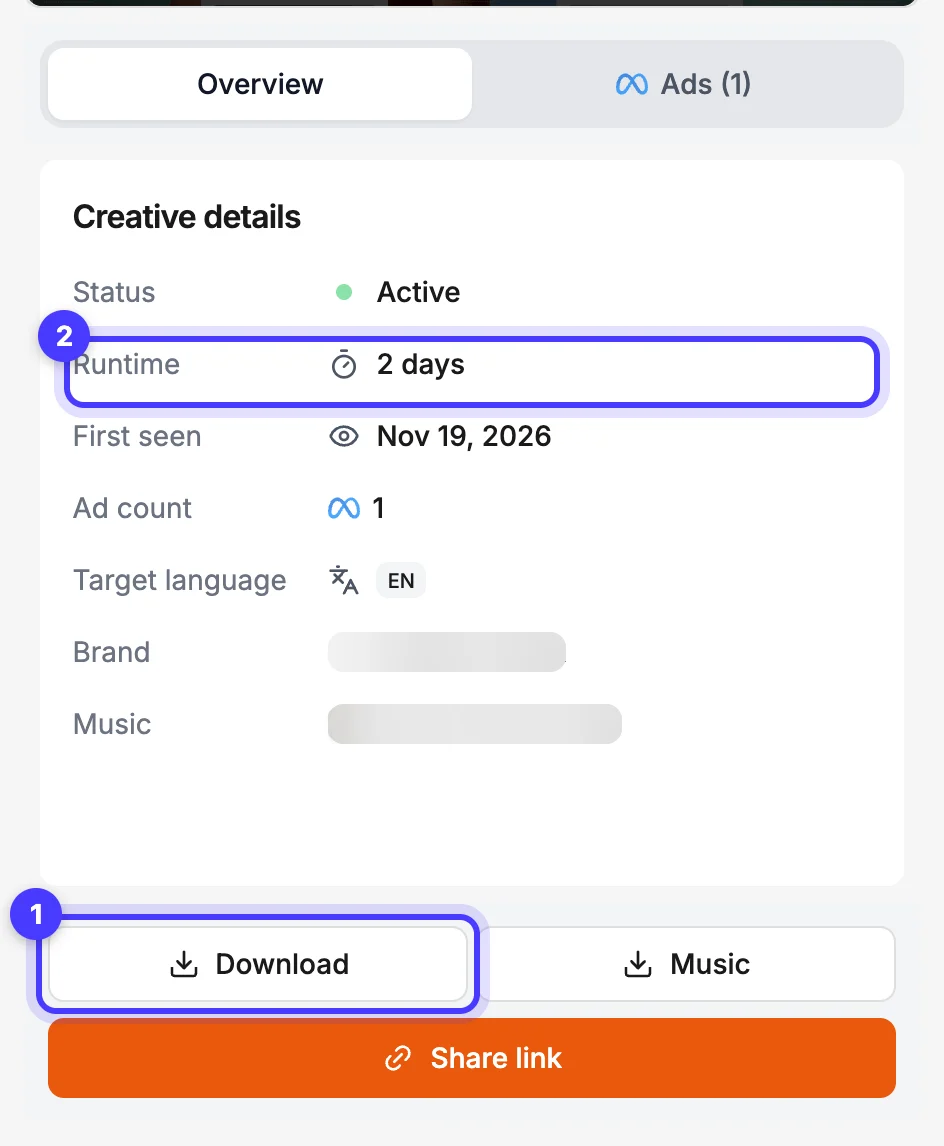
Three things make this better than a library recording for research. The file is the original video, not a capture of your screen. A creative that ran as several ads appears once instead of once per version. And ended creatives stay in Adspo with their full lifespan, so an Australian ad that has left the Meta Ad Library can still be opened and downloaded. In Claude, the Adspo connector returns a link to each creative's video file as well, which is how we pull a set of references into a brief without opening the app; our guide to the Meta Ad Library in Claude shows the setup.
Adspo costs US$29 a month with a 7-day free trial, or US$19 a month billed yearly with a 14-day trial (checked 23 November 2026). Know its limits before you pay: it covers Meta ads only, it is built around a curated set of more than 10,000 verified brands weighted to ecommerce, and local trade and service businesses are thin or missing. For those, the Meta Ad Library and your screen recorder are still the route. It shows no spend or sales data for any brand. Our Adspo review covers what it does and does not do in full.
Keep downloads in boards, not a downloads folder
Loose video files get lost. In Adspo we save each reference to a board for the brief it supports, then download or share the board when the editor or client needs it. A board's public share link opens without an Adspo account, so a client can watch the set without logging in to anything.
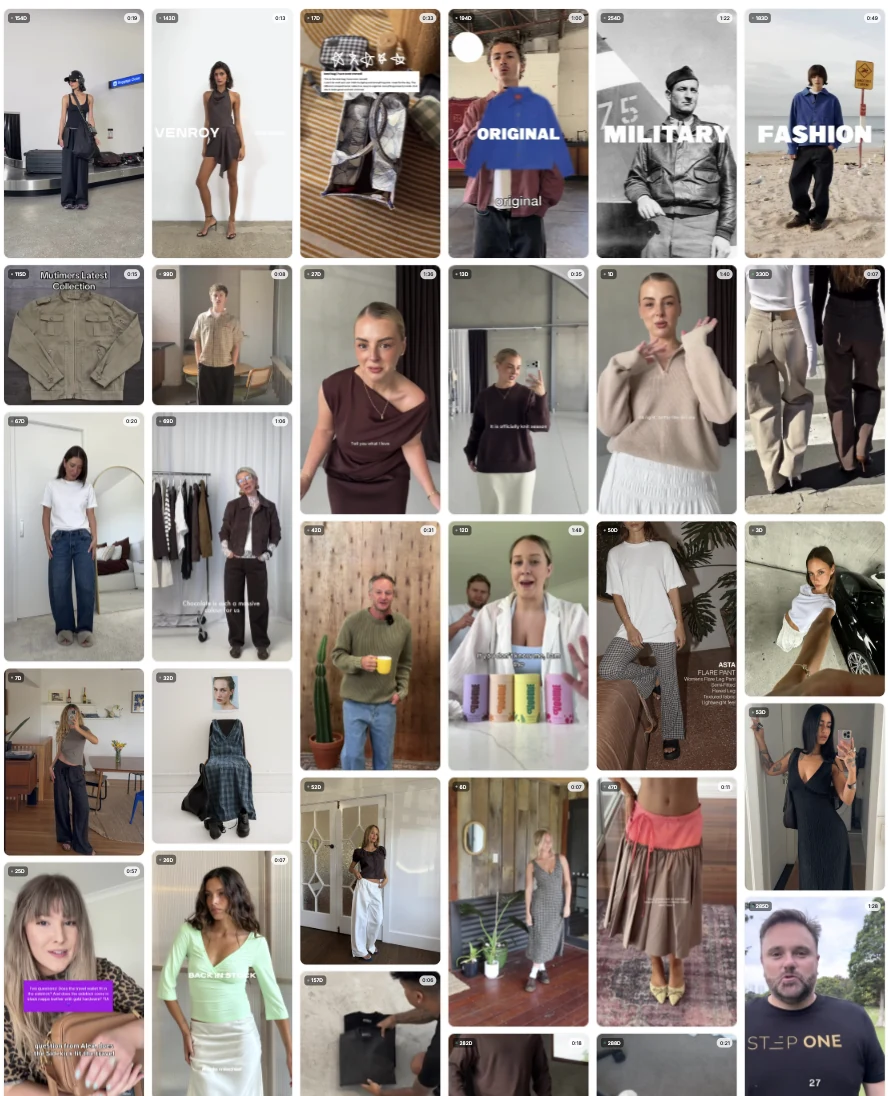
For each persona we brief, we build a board of 20 distinct ads, no more than two from the brand itself, and every one has to show the exact moment that matches the persona's problem: the overlay text, the voiceover line or the demonstration. Near duplicates count once. We search outside the product's own category when another category solves the same problem on screen. Our ad swipe file guide covers the fields we record and how we organise boards across brands.
What makes an ad worth testing?
Explore 46 real ads and 17 landing pages. We break down the offer, the proof and what we’d try next.
Downloading Ad Library data instead of videos
Some people searching for an Ad Library download want the data, not the creative. Here is what Meta offers natively:
| Download | What you get | Who it suits |
|---|---|---|
| Ad Library search download | Your search results, after logging in to Facebook and agreeing to the terms | Anyone keeping a dated record of a search |
| Ad Library report (.csv) | Number of ads and amount spent on ads about social issues, elections or politics, by advertiser and location, for a date range ending in the last 7 days | Political, government and cause advertisers, and anyone researching them |
| Ad Library API | Programmatic access to political and issue ads and ads delivered to the EU and associated territories | Developers and researchers |
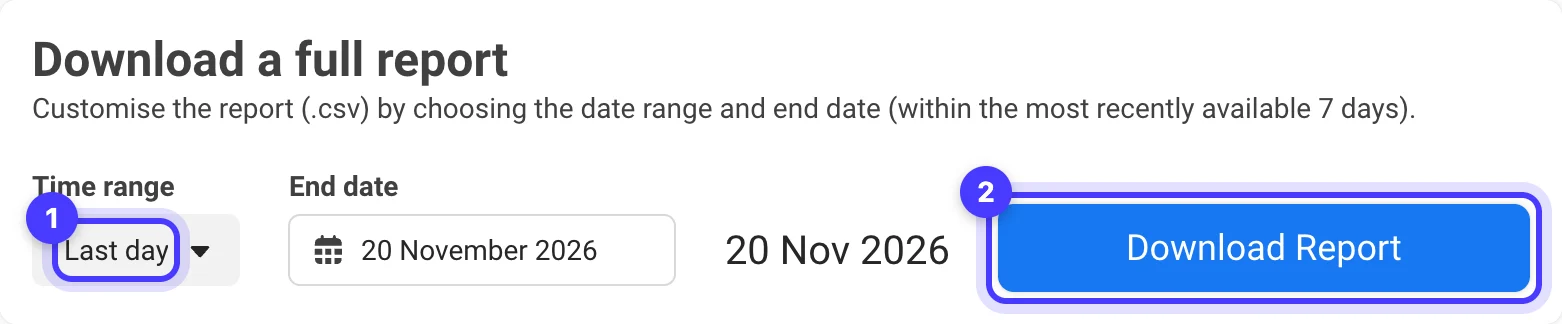
None of these return spend, reach or results for an ordinary Australian ecommerce ad. Nothing public does. Read longevity and the number of copies an advertiser runs as signals of what they keep paying for, never as proof that an ad is profitable.
What to do with a downloaded ad
Take the pattern, never the ad. A competitor's hook structure, the order of their demonstration, the length of the opening shot and the type of proof they use are fair game for your brief. Their footage, music, claims, voiceover script and distinctive look are not, and re-uploading another brand's video is the fastest way to a rejected ad and a takedown request.
A good brief from downloaded references names the pattern in each clip ("problem shown in the first two seconds, product solves it on screen by second five"), then asks for your own version with your product and your proof. Our guide to how many ad creatives to test sets how many concepts to brief at once, and the Meta ads preview tool shows how your finished video looks in Feed, Stories and Reels before it goes live.
If you would rather hand over the research, the brief and the testing, that is the creative work we run for brands every week.
Questions we get about downloading Ad Library videos
Is there an official way to download a video from the Meta Ad Library?
No. The library has no download control on an ad's video or image. Meta's downloads cover Ad Library search results when you are logged in and the Ad Library report on spending for ads about social issues, elections or politics.
Can I download Facebook Ad Library videos in HD?
A screen recording is only as sharp as the video on your screen, so play it full size first. Adspo keeps HD and SD copies of each video creative and downloads the original file.
Is it legal to download a competitor's ad?
Keeping a copy for internal research and briefs is how agencies work every day. Reusing the footage, music, script or claims in your own ads is a different matter: the ad belongs to the advertiser, so take the pattern and make your own version.
Why can't I find an ad I saw last week?
If it ran only in Australia and has stopped, the Meta Ad Library no longer shows it. Ads delivered to the UK or EU stay for a year after their last impression, and political and issue ads for seven years. Adspo keeps ended creatives from the brands it tracks.
Can I download image ads from the Ad Library too?
The same rules apply: no download button in the library. Take a screenshot of the card with the Library ID visible, or download the image from Adspo.
Does Adspo cover TikTok or Google ads?
No. Adspo covers Meta ads only. For TikTok use TikTok's own Creative Center and Commercial Content Library, and for Google use the Ads Transparency Center.
Sources
- Meta Business Help Centre: About the Meta Ad Library
- Meta Ad Library
- Meta Ad Library report: Australia
- Adspo: product and pricing summary (adspo.co/llms.txt)
- Adspo pricing
Disclosure: Hey Sage uses Adspo for client work and earns a referral fee when you subscribe through our Adspo links.