
On this page
- 01 · How to see a competitor's landing pages
- 02 · Find the page behind each ad in the Meta Ad Library
- 03 · Search by domain and by button wording
- 04 · See every landing page a brand runs in Adspo
- 05 · What to record for each landing page
- 06 · How to read what you find
- 07 · Worked example: three competitors, one afternoon
- 08 · Turn the research into your own page
- 09 · Questions we get about competitor landing pages
- 10 · Sources
How to see a competitor's landing pages
Open the Meta Ad Library, set the country to Australia and the category to All ads, pick the competitor's Page, then click the headline or button on each ad. That opens the exact page the ad sends people to. Work through every ad, including the versions hidden under See ad details, and paste each URL into a log. You will usually find a handful of destinations, and the ones carrying the most ads are the pages the brand is spending behind.
For more than one or two competitors, an ad research tool saves the clicking. In Adspo, every creative lists the ads behind it with each ad's destination, and a brand's profile lists its landing pages with the number of ads pointing at each one. Neither the free library nor any tool shows how much traffic or how many sales a page gets, so treat the ad count and how long ads have pointed at a page as the signal.
Find the page behind each ad in the Meta Ad Library
This is the free route, and it is the one we use for local trade and service businesses, which ad tools cover thinly.
- Go to the Meta Ad Library, choose Australia and All ads, and type the competitor's name into Search by keyword or advertiser. Choose their Page from the advertiser suggestions rather than running a keyword search, so you only see their ads. Our guide to seeing competitors' Facebook ads covers finding every Page and Instagram account a brand advertises from.
- On each ad card, click the headline area under the creative or the button (Shop Now, Learn More, Sign Up). The library opens the destination in a new tab.
- Where a card says This ad has multiple versions, open See ad details and click through each version. Versions of one ad can send people to different pages, which is often how a brand tests a new page against its usual one.
- Copy the address from the browser, then delete the tracking on the end (anything after ?fbclid=, ?utm_ and similar) so the same page does not appear in your log three times.
- Open the page on your phone as well. Feed and Reels ads are mostly seen on phones, so the first screen on a phone is the one that has to work.
The library only shows ads that are running now for ads delivered in Australia. An ad that stops running drops out, and its landing page goes with it, unless the ad also reached the UK or EU. That is why we log destinations weekly instead of relying on finding them later. Our Meta Ad Library guide for Australia walks through the filters.

Run Better Ads: our free ecommerce guide
We’ve tracked $700m+ in ad revenue across 200+ brands. See how we work out what a sale can cost and choose which ad to test next.
Search by domain and by button wording
Two searches find landing pages that browsing one Page misses.
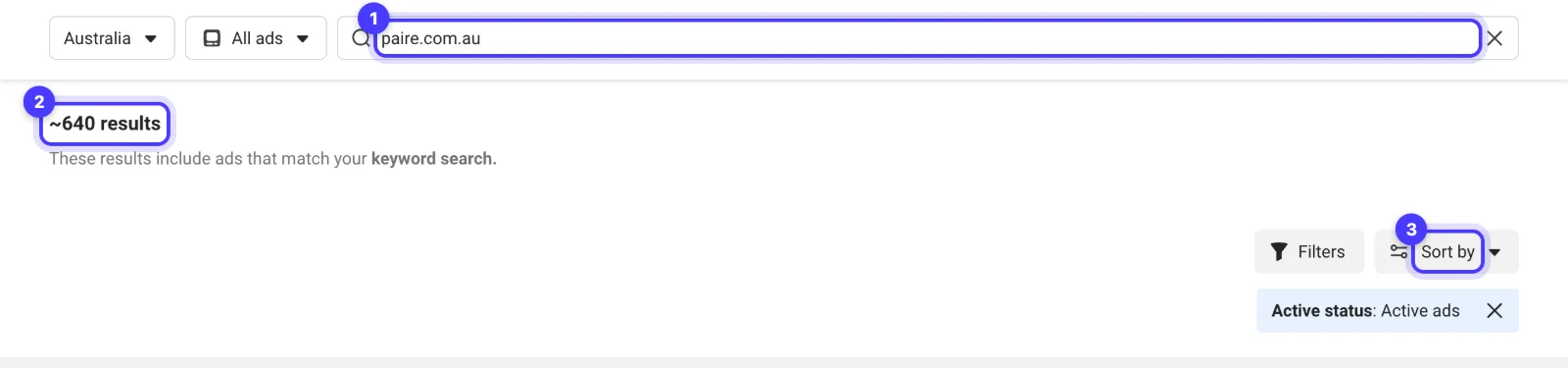
Search the competitor's domain. Type the domain, for example paire.com.au, as a keyword with Australia and All ads selected. When we ran it on 22 November 2026 it returned about 640 active ads, and each card shows the link it sends people to, so a quick scroll shows which paths come up again and again (a listicle page here, a travel page there). Sort the results by newest to see which pages are being added now.
Search the button or offer wording. To see how brands in your category use a particular kind of page, search the words people click. With exact phrase search, "take the quiz" returned about 9,100 active ads in Australia today. Clicking through a dozen in your category shows you how competitors build quiz funnels, what they ask and where the quiz ends.
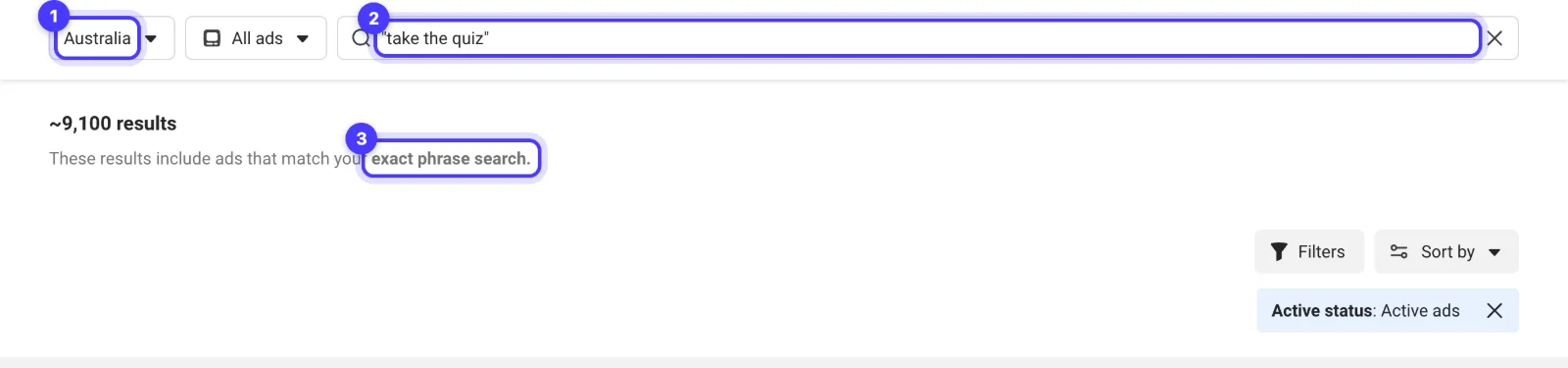
Swap the phrase for the page type you care about: "shop the sale", "book a free", "get your quote" or "limited stock".
See every landing page a brand runs in Adspo
Clicking through ads one by one stops being practical once a competitor runs a few hundred of them. We follow each client brand's competitors in its own Adspo workspace, and the landing page data is the part of it that saves the most time on this job.
- Landing pages on the brand profile. Each brand's profile lists its landing pages with the number of ads pointing at each and its share of the total, so the brand's main pages are at the top without a single click.
- Connected ads on each creative. Open a creative and switch to the Ads tab. Every Meta ad using that creative is listed with how long it has run, the countries it targets, a link to the same ad in Meta's Ad Library and the button that opens its landing page.
- Search by landing page URL. Adspo's search reads ad copy, transcripts, on-screen text and landing page URLs. A search for a path such as "quiz" or "black-friday" limited to landing pages shows every ad pointing at that kind of page. We run this one through the Adspo connector in Claude when we brief.
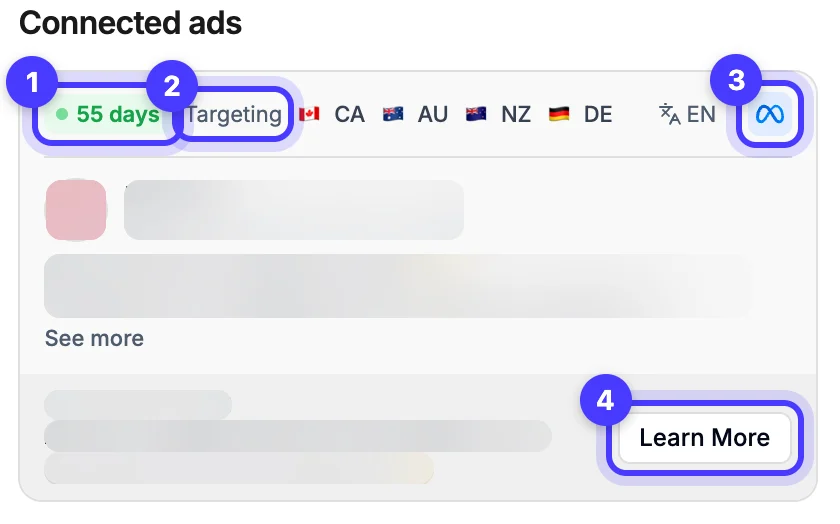
On the creative in that screenshot, a sleep product's video, the 28 ads behind it pointed at no fewer than four destinations: a product page, two custom pages and a separate funnel on its own subdomain. The free library shows those as 28 separate cards. Adspo shows them as one creative with its pages side by side, which is exactly the comparison you want.
Adspo has real limits here. It covers Meta only, it follows verified brands rather than every advertiser (local trades and services are thin or missing, so for those we go back to the Meta Ad Library), and it has no traffic, spend or conversion data for any page. Pro is US$29 a month with a 7-day free trial, or US$19 a month billed yearly with a 14-day trial. Our Adspo review covers the rest of the tool.
What to record for each landing page
A list of URLs tells you little. These are the fields we fill in for each page, one row per page, not per ad.
| Field | What to write | Why it matters |
|---|---|---|
| URL (cleaned) | The address without tracking | Lets you spot the same page across ads |
| Page type | Product, collection, custom landing page, listicle or advertorial, quiz, lead form, homepage | Shows how the brand handles cold traffic |
| Ads pointing at it | Count from the library or Adspo | The closest public signal of where spend goes |
| First seen | Earliest start date of an ad using it | A page fed for months is part of the system, not a test |
| Offer match | Does the page repeat the ad's offer and wording on the first screen? | The most common gap between an ad and its page |
| First screen on mobile | Headline, image, price, proof, button | What a reader decides on before scrolling |
| Proof | Reviews, press, guarantees, counts | Which objections they answer first |
| Next step | Add to cart, quiz start, form, call | How much they ask of a cold visitor |
Screenshot the first screen on mobile and save it with the row. Pages change without notice, and the version that was running when you looked is the one worth comparing.
How to read what you find
- Many ads on one page means the brand trusts it. A custom page carrying dozens of ads for months is the strongest public sign you will find that it earns its keep.
- A new page with a few ads is usually a test. Check back in two weeks: if the ad count grows, the test is winning.
- Different pages for the same creative show what the brand is testing: the page, not the ad. Note which version is still running later.
- Homepages for cold traffic are a gap, not a model. We rarely send a cold ad to a homepage, and a competitor that does is giving you room to be more specific.
- Treat everything as a signal, never proof. Ad count and runtime say where a brand spends; they say nothing about margin or conversion rate. Meta shows no traffic for any page, and third-party traffic figures are estimates.
What makes an ad worth testing?
Explore 46 real ads and 17 landing pages. We break down the offer, the proof and what we’d try next.
Worked example: three competitors, one afternoon
An invented example. An Australian sleepwear brand is planning a summer range and wants to know where its three closest competitors send cold traffic.
- Competitor A has 140 active ads. Its brand profile shows two thirds of them going to one collection page and most of the rest to a "4 reasons" listicle page. The listicle page repeats each ad's first line as its headline.
- Competitor B has 35 ads, all to product pages, with the price and an afterpay line on the first screen.
- Competitor C has 60 ads. A domain search shows a quiz page that appeared nine days ago with five ads. Too new to judge; it goes on the watch list.
The log shows two things worth testing: a listicle page for the new range against the current collection page, and the price on the first screen. That becomes the brief for one custom landing page and one ad set, not a site rebuild.
Turn the research into your own page
Take the pattern, never the page. A competitor's structure (listicle, quiz, bundle builder) and the order they answer objections are fair game; their copy, images, claims and design are not. Then decide what the ad needs: our guide on product page, collection or landing page helps you pick the destination, cold traffic landing pages covers what the first screen must do, and the cold traffic landing page planner turns your notes into a page outline.
If you would rather we did the research, the brief and the page, that is the work we do for brands every week. A free Adspo trial is enough to run this check on your own competitors first.
Questions we get about competitor landing pages
Can I see a competitor's landing pages without clicking their ads?
Yes. In the Meta Ad Library, each ad card links straight to its page, so you never need to find the ad in your own feed. Ad research tools such as Adspo list each brand's landing pages with the number of ads pointing at each, so you can see them all at once.
Can I see how much traffic a competitor's landing page gets?
No. Meta publishes no traffic, spend or conversion data for any landing page, and neither does Adspo. Third-party traffic figures are modelled estimates. The best public signal is how many ads point at a page and for how long.
Why can't I find a landing page I saw last month?
The Meta Ad Library only shows ads that are running now, unless the ad also reached the UK or EU. When the ads stop, their landing pages drop out of the library. Log destinations weekly, or use a tool that keeps ended ads.
Is it fine to copy a competitor's landing page?
Copy the structure and the order of the argument, never the words, images, claims or design. A page built on your own product, proof and offer will also convert better than a lookalike.
Does this work for Google Ads landing pages?
The method is the same, but the source is Google's free Ads Transparency Centre, where you search by advertiser name or website to see the active ads a business runs through Google.
Sources
- Meta Business Help Centre: About the Meta Ad Library
- Meta Ad Library
- Adspo: product and pricing summary (adspo.co/llms.txt)
- Adspo pricing
- Google Ads Transparency Centre
Disclosure: Hey Sage uses Adspo for client work and earns a referral fee when you subscribe through our Adspo links.