
On this page
- 01 · Can Claude audit a Meta ads account?
- 02 · Connect it read-only first
- 03 · Eight checks to ask Claude to run
- 04 · A worked example: one purchase, counted twice
- 05 · The audit prompt
- 06 · Running it across many accounts
- 07 · What a person still decides
- 08 · Questions we get about auditing Meta ads with Claude
- 09 · Sources
Can Claude audit a Meta ads account?
Yes. Claude is good at the half of a Meta audit that lives in data: whether purchases are counted once, which attribution setting each ad set uses, which ad sets are stuck in learning, which ads are tiring, where spend goes without sales and what changed last week. Connect it read-only, give it eight fixed checks with your own thresholds, and make it show every finding in a table. A person then decides what to change.
Claude cannot place a test order, judge your landing page on a phone or know that a spike was a sale weekend. Those stay with you. This guide covers the read-only setup, the eight checks, a worked example where a broken purchase event doubles ROAS, the prompt, how to save it as a Claude skill and what we learned running audits across many accounts. To connect Claude to Meta in the first place, start with our guide to Claude and Meta ads; the Google version of this audit is our Claude Google Ads audit.
Connect it read-only first
An audit should change nothing, and Meta's own server can change a lot: it creates and edits campaigns, ad sets and ads. Pick a route that cannot write, or switch the writing off before the first prompt.
| Route | What the audit can see | Can it change your ads? | Cost |
|---|---|---|---|
| Meta's ads MCP server | Performance by campaign, ad set and ad with breakdowns, dataset quality (Event Match Quality and event volume by source), the activity log and opportunity score recommendations | Yes, unless you stop it. In Claude, open Customize > Connectors, select the connector, open its Tools tab and set the write tools to Blocked. With your own Meta app, grant ads_read rather than ads_management | No extra Meta charge |
| Whatagraph connector | Campaign, ad set and ad performance and breakdowns, with Google Ads and GA4 in the same chat | No. Its write tools act on Whatagraph reports | From US$812 a month billed annually (agency pricing) |
| CSV export from Ads Manager | Whatever columns and breakdowns you export | No | Free, slow to repeat |
Meta's server is the only route here that reads Events Manager data and the activity log, so for checks 1 and 7 below it is the best source even when another route does the rest. Block its write tools and it is a read-only auditor.

Run Better Ads: our free ecommerce guide
We’ve tracked $700m+ in ad revenue across 200+ brands. See how we work out what a sale can cost and choose which ad to test next.
Eight checks to ask Claude to run
Each check names the data and what counts as a finding. The thresholds are where we start; set yours from your margins.
- Is each purchase counted once? Pull Purchase events received in the last 28 days by source (browser and server) and compare them with store orders for the same days. Meta deduplicates a Pixel event and a Conversions API event only when the Pixel's eventID matches the server's event_id and the event names match. Finding: Purchase events running well above store orders, or server events with no event_id. Ask for Event Match Quality by match key at the same time. Our Pixel and Conversions API guide for Shopify covers the setup.
- Attribution setting per ad set. Pull the attribution model (standard or incremental) and windows for every active ad set. Meta says results from ad sets on different attribution models cannot be compared in one table. Finding: mixed models in one comparison, or a mix of 1-day and 7-day click that makes some ad sets look better than they are. Our attribution setting guide shows the gap in numbers.
- Meta against GA4 and the store. Compare Meta's purchase value with GA4 revenue from paid social and with store revenue for the same dates. Meta's purchases include view-through conversions and overlap with GA4's, so they will be higher. Finding: Meta claiming more than about twice GA4's paid social revenue, or a share of all store orders that email and search could not leave room for.
- Learning limited. Meta marks an ad set Learning limited when it is unlikely to get about 50 optimisation events in the week after its last significant edit. Finding: budget spread across several ad sets that each fall short, which combining would fix. See our Learning limited guide.
- Creative fatigue. Pull delivery statuses and, for ads with real spend, frequency and link click-through rate for the last 7 days against the 21 days before. Meta shows Creative limited when an ad's cost per result is above your past ads but under twice as much, and Creative fatigue at twice or more. Finding: either status, or frequency up while link CTR falls by 20% or more. Our frequency guide covers what a rising number means.
- Spend without sales. Ads that spent more than your target cost per purchase with no purchase in the last 14 days, and the placement and device split. Finding: thin rows, under 10 purchases, that the account is treating as proven.
- What changed. The activity log for the last 30 days set against daily spend and purchases. Pausing, a new optimisation event, audience or creative are significant edits; budget and bid changes are, depending on size. Finding: a significant edit in the week before results moved.
- Opportunity score. Pull the score (0 to 100) and its recommendations with their point values. Meta says the score does not reflect actual or future performance. Finding: a recommendation that one of your own checks contradicts. Apply the ones your checks support.

Check 6 is where small rows mislead. A device or placement with nine purchases has a cost per purchase too thin to act on, however good or bad it looks. Tell Claude to mark any row under 10 purchases instead of ranking it.
A worked example: one purchase, counted twice
An invented fashion store spends $20,000 on Meta over 28 days. Ads Manager shows 610 purchases worth $79,300: a ROAS of 3.97 at $32.79 a purchase.
Check 1 finds 1,190 Purchase events in the same 28 days: 640 from the browser and 550 from the server. The store took 640 orders in total, from every channel. The Pixel sends the order number as its event ID and the server sends the checkout token, so the two never match and Meta cannot remove the duplicates. Check 3 agrees: Meta is claiming 610 of the store's 640 orders, 95% of every sale, while email and Google both drove orders that month, and GA4 shows $36,900 of revenue from paid social.
Scaling Meta's purchases by real orders over events received (640 out of 1,190) gives the estimate below. The store's Pixel sends prices including GST, so the last row divides value by 1.1 before comparing it with break-even.
| As reported | Duplicates removed (estimate) | |
|---|---|---|
| Purchases | 610 | 328 |
| Purchase value | $79,300 | $42,640 |
| ROAS | 3.97 | 2.13 |
| Cost per purchase | $32.79 | $60.98 |
| ROAS excluding GST | 3.60 | 1.94 |
If the store needs a ROAS of 2.4 excluding GST to break even (work yours out with the break-even ROAS guide), it is losing money on Meta while reporting a healthy 3.97. Claude's job ends at the table. The fix is a person's: send the same ID from both sides, watch Purchase events fall back in line with orders, then reset cost controls and budgets against the lower, real numbers. This is also why our reports judge the whole account on GA4 revenue against total spend, which our MER vs ROAS guide explains.
The audit prompt
Use the same prompt on every account so the answers line up. Shortened, with an invented store:
"Audit Example Store's Meta ad account, last 28 complete days, money in AUD including GST. Read only: change nothing. Run these checks in order and give one table per check with the rows that fail: (1) Purchase events by source against 640 store orders, plus Event Match Quality by match key; (2) attribution model and windows for every active ad set; (3) Meta purchase value against GA4 paid social revenue and store revenue; (4) ad sets with fewer than 50 optimisation events since their last significant edit; (5) delivery status, frequency and link CTR for the last 7 days against the 21 before, for ads over $300 spend; (6) ads over $60 spend with no purchase in 14 days, and spend and purchases by placement and device, marking rows under 10 purchases; (7) activity log changes in the last 30 days next to daily spend and purchases; (8) opportunity score recommendations with points. State the attribution setting behind every purchase number. Finish with the five findings that cost the most money, each with the evidence and the number it rests on. Do not recommend anything you have not shown in a table."
Two lines do most of the work. Naming the attribution setting stops Claude mixing windows, and the last line stops it filling gaps with generic advice (test more creative, broaden targeting) that no data supports.
Saving it as a Claude skill
A skill is a folder Claude loads when a task matches it, so the audit runs the same way without pasting the prompt. Put the checks and thresholds in a skill.md file that starts with a name (64 characters at most) and a description (200 characters at most; Claude reads it to decide when to load the skill). Zip the folder and upload it under Customize > Skills.
Community Meta audit skills advertise 50 or more checks. Read the skill.md before you install one: a long generic list gives a long generic report, and no third-party skill should sit next to a connector that can write to your ad account.
What makes an ad worth testing?
Explore 46 real ads and 17 landing pages. We break down the offer, the proof and what we’d try next.
Running it across many accounts
We run read-only audits of every client's ad account through the Whatagraph connector, with several Claude agents working in parallel. Every client report we build sits on Meta Ads, Google Ads and GA4, so check 3 needs no second tool and the audit reads the same numbers the client sees in their report. If you report across several accounts, that is the reason to run audits through Whatagraph: one sign-in covers every account and channel.
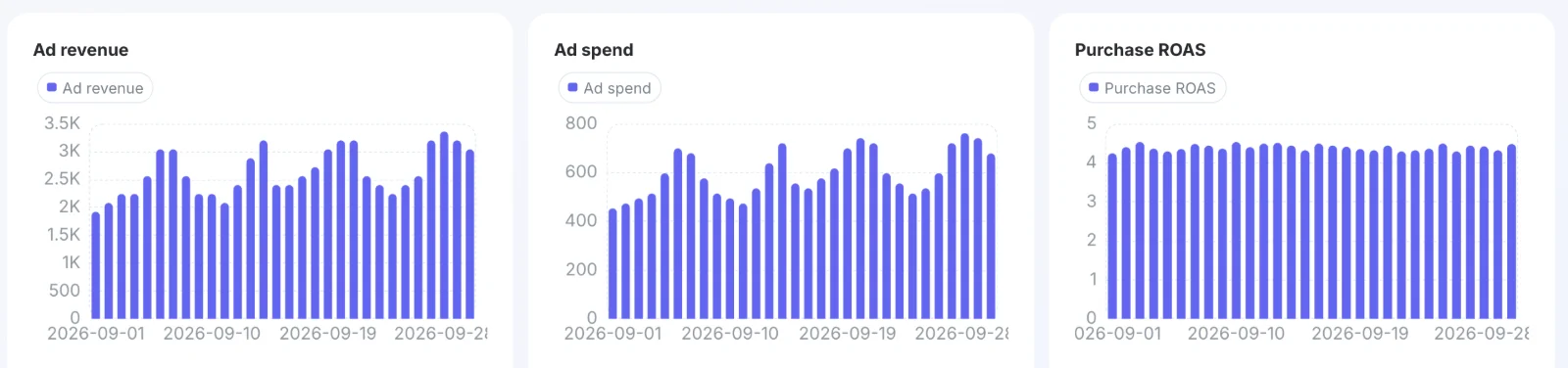
What running it at that scale taught us about Meta in particular:
- Three to five agents at a time. Bursts of more than about eight MCP calls get rate-limited, with 25 to 60 second back-offs.
- Page large reads. Responses cap at about 50 KB, so an ad-level read of a big account arrives in parts. Tell Claude to fetch every page before it summarises.
- Meta is slow at ad level. Ad-level reads can take over two minutes, and Meta sometimes answers "data not ready". A 90-day creative read can fail where 60 days works, so audit creative over 60 days.
- Never add channel revenue together. Meta's purchases overlap with GA4's and Google's, so a total built from channel rows counts some sales twice. Ask for GA4 revenue against total spend instead.
- Check one number by hand. Before acting on a finding, match one campaign's spend against Ads Manager for the same dates.
Setup and permission settings for the connector are in our Whatagraph MCP guide. For one account, Meta's free server or a CSV export does the job; Whatagraph earns its price when you report on many.
What a person still decides
Claude reads every ad set without getting bored. It does not know your margin, your stock or your launch calendar, and it is not accountable for the budget. Keep these with a person:
- A test purchase. Buy something and watch one Purchase event arrive in Events Manager with the same ID from browser and server.
- The landing page on a phone. Most Meta spend lands on mobile, and whether the page keeps the ad's promise is a judgement.
- Every change. Claude proposes; a person applies. A significant edit restarts learning, and an agent making daily edits keeps ad sets there.
- Which recommendations to apply. Opportunity score points reward following Meta's suggestions, not results.
For the checks that need eyes rather than data (consent, catalogue, creative quality), download the Meta audit checklist in our Meta ads strategy guide. Once the audit is done, the numbers worth watching belong in a monthly report, and our Meta ads report guide shows what goes in it. If you would rather hand the audit and the fixes to people who do this every day, that is our Meta ads management.
Questions we get about auditing Meta ads with Claude
Can Claude audit Meta ads for free?
Yes. Meta's ads MCP server costs nothing extra, and Claude's free plan allows one custom connector. Set the server's write tools to Blocked under Customize > Connectors before you start. A CSV export from Ads Manager also works for a one-off audit.
Is there a Claude skill for Meta ads audits?
Several community skills exist, and you can write your own: a folder with a skill.md file holding a name, a description and your checks, zipped and uploaded under Customize > Skills. Eight checks with your own thresholds beat a long generic list.
Can Claude see Events Manager and the activity log?
Through Meta's ads MCP server, yes. It reads dataset quality, including Event Match Quality and event volume by source, and the ad account's activity log, which mirrors campaign history in Ads Manager.
Why does Meta report more purchases than my store?
Meta counts view-through conversions and purchases that GA4 and Google also claim. If Purchase events run well above store orders, the Pixel and Conversions API are probably not deduplicating: both must send the same event ID and event name.
Should I apply Meta's opportunity score recommendations?
Apply the ones your own checks support. Each recommendation adds points to the score, and Meta says the score does not reflect actual or future performance.
Sources
- Meta for Developers: Ads MCP server overview
- Meta for Developers: Ads MCP server, get started (permissions)
- Meta for Developers: Ads MCP server, comprehensive reporting tools
- Meta for Developers: Ads MCP server, signals and datasets tools
- Meta for Developers: Ads MCP server, activity logs tools
- Meta for Developers: Deduplicate Pixel and server events
- Meta for Developers: Opportunity score and recommendations
- Meta Business Help Centre: About attribution models and attribution settings
- Meta Business Help Centre: About learning limited
- Meta Business Help Centre: Last significant edit
- Meta Business Help Centre: About creative fatigue recommendations in Meta Ads Manager
- Claude Help Center: Use connectors to extend Claude's capabilities
- Claude Help Center: How to create custom skills
- Whatagraph: Pricing
- Whatagraph Help Center: Connect Whatagraph to your AI assistant with MCP
Disclosure: Hey Sage uses Whatagraph for client reporting and earns a referral fee when you subscribe through our Whatagraph links.