
On this page
- 01 · Which competitor tracking tool should an agency choose?
- 02 · Compare the 10 tools by their monitoring strengths
- 03 · How we ranked these tools
- 04 · 1. Adspo: our pick for agency Meta ad monitoring
- 05 · 2. Foreplay: best for a detailed creative timeline
- 06 · 3. Atria: best for weekly updates alongside creative work
- 07 · 4. Swipekit: best for a focused brand tracking routine
- 08 · 5. Denote: best for collecting brand updates into boards
- 09 · 6. GetHookd: best for choosing your digest frequency
- 10 · 7. TrendTrack: best for monitoring the wider ecommerce shop
- 11 · 8. BigSpy: best for broad page and domain research
- 12 · 9. AdsLibrary.ai: best for tracking beside saved references
- 13 · 10. Minea: best for product research with shop tracking
- 14 · A weekly monitoring routine your team can use
- 15 · Choose the tool that makes next week's review easier
- 16 · Questions about Meta ad competitor tracking
- 17 · Sources
Which competitor tracking tool should an agency choose?
Adspo is our first recommendation for agencies researching Meta ads. We use a separate space for each client brand, more than 20 in total, following competitors and adjacent brands inside each. That gives research a home before it becomes a board, a brief or a client conversation.
The job here is ongoing monitoring: seeing what changed since the last review, keeping creative history and handing the useful findings to the right client team. If you mainly need fresh brands to explore, use our Meta ad spy tools for ecommerce comparison. If your problem is organising references you already found, start with our Meta ad swipe file tools guide.
Compare the 10 tools by their monitoring strengths
| Tool | Best fit | What to review regularly |
|---|---|---|
| Adspo | Our agency Meta research workflow | Tracked creatives, launch and funnel alerts, client boards |
| Foreplay | Detailed competitor creative timelines | Spyder archives, creative tests, hooks and landing pages |
| Atria | Research alongside creative production | Followed brands and weekly email updates |
| Swipekit | A focused brand tracking routine | Launch timelines, format mix and landing page links |
| Denote | Brand updates collected into boards | Tracking Boards and saved ad history |
| GetHookd | Configurable competitor digests | Brand Spy activity and email summaries |
| TrendTrack | Ecommerce shop context | Daily refreshed tracking, products and shop activity |
| BigSpy | Broad advertiser and domain research | Followed pages, domains and selected tracked ads |
| AdsLibrary.ai | Tracking beside a shared reference library | Advertisers and the status of saved ads |
| Minea | Product research with brand monitoring | Tracked shops, ads and available notifications |
Budget for the complete watchlist. An agency with several clients can reach a brand limit quickly, even when each client follows only a handful of competitors. Count seats, tracked brands and notification allowances separately.

Run Better Ads. The free guide + vault.
137 pages on ecommerce ads, with 46 real ads and 17 landing pages taken apart.
How we ranked these tools
We prioritised five things: coverage of the brands you need, collection of new ads over time, readable creative history, a manageable review process and a clear handoff to the client team. Adspo comes first because it fits the workflow we use across our client spaces. The other recommendations compare their documented features and the agency jobs those features suit, with details checked on 16 November 2026.
A useful trial follows the same five brands in each candidate tool. Include a direct competitor, a larger category leader and an adjacent brand with relevant customers. Return a week later. Check what appeared, what stayed available and how easily a colleague can understand your notes. Open a shared board as a guest too, so you see exactly what a client would see.
1. Adspo: our pick for agency Meta ad monitoring
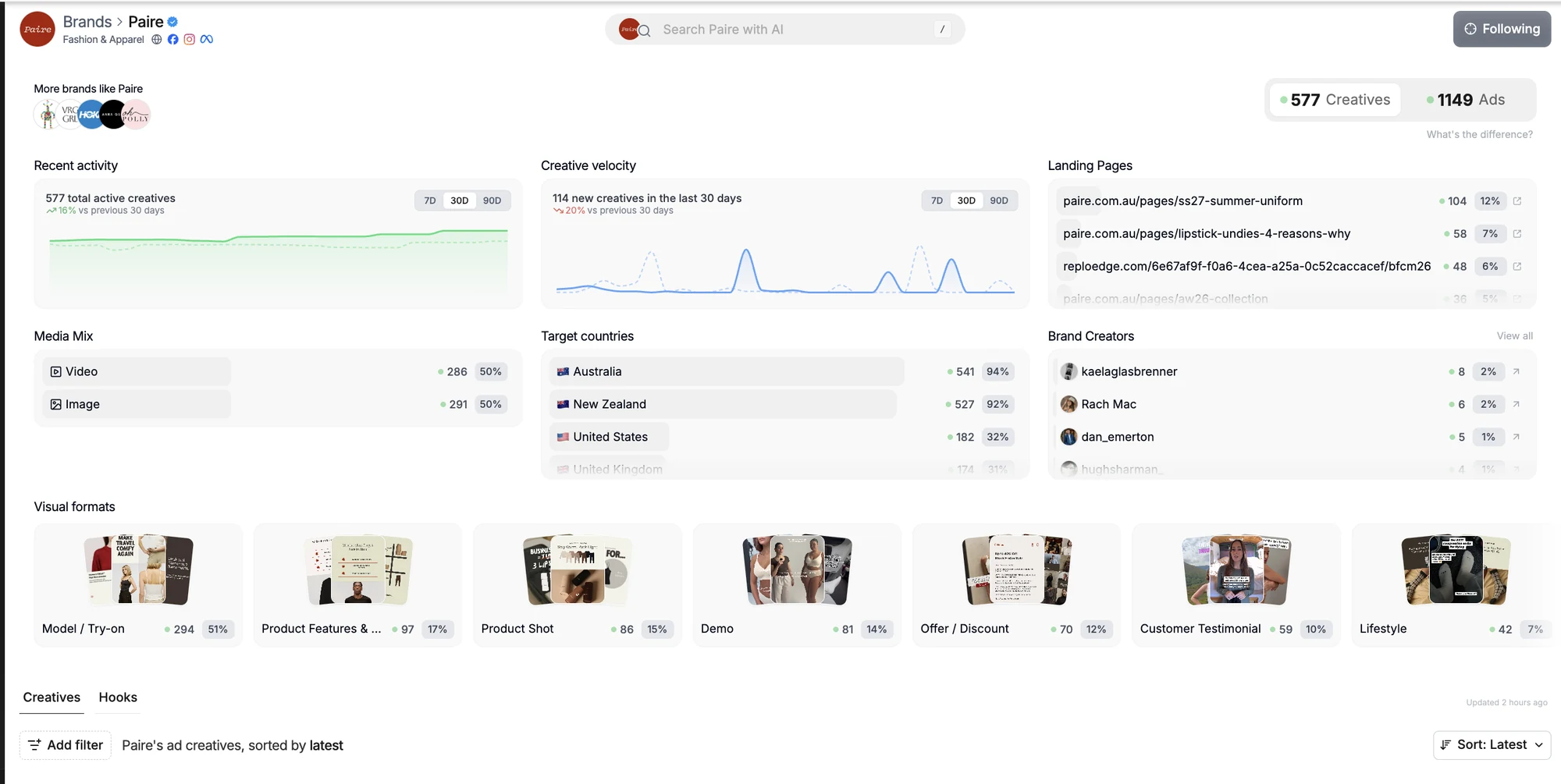
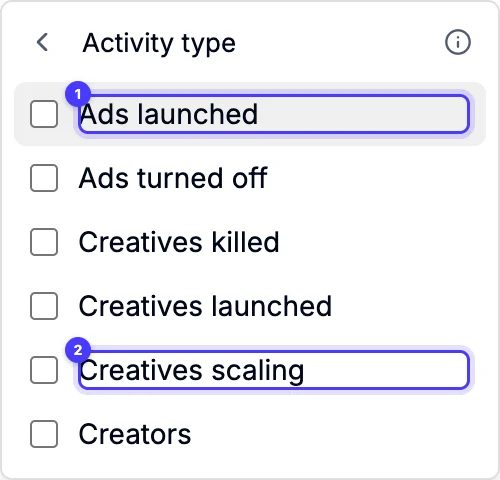
Adspo brings brand tracking, creative history, alerts and boards into the same workspace. It groups connected ads around each unique creative and keeps launch dates and lifespan information. Alerts cover new ads, creatives gaining delivery and funnel changes, giving you specific changes to investigate.
Our setup is one space per client, following competitors and adjacent brands, with boards organised by theme or month. For persona research we curate 20 distinct ads per board, with no more than two from the client's own brand. Shared boards sit beside the relevant persona in the client's portal.
That organisation is why it leads this list. Meta is its focus, and its local trade and service coverage is thin. We use the free library directly when those brands are missing. Our Adspo review covers the wider workflow.

2. Foreplay: best for a detailed creative timeline
Foreplay's Spyder automatically tracks competitors across Meta and builds an archive of the ads it collects. Its timeline, creative test views, transcribed hooks and landing page records help a strategist examine a launch as a sequence.
That is useful when your question is how an offer developed: which hooks arrived together, which formats followed and which page the campaign sent people to. Separate the date you started tracking from any earlier history available for that brand.
Choose a plan that includes Spyder and enough tracked brands for your client roster. Foreplay's general inspiration library and its automatic tracker serve different jobs, so trial the tracking feature itself.
3. Atria: best for weekly updates alongside creative work
Atria lets teams follow brands, review their latest ads and receive weekly brand emails. Its research features sit beside asset organisation, creative production and analysis of connected ad accounts.
It suits a team that wants competitor research close to the people writing scripts and making ads. Follow allowances vary by plan, and AI insights about followed brands are a separate consideration: Core includes following, while Plus and Business add those insights.
During the trial, review one brand update with your creative team. Look for a specific angle or hook worth investigating, then check how easily the relevant reference reaches the person preparing the brief.
4. Swipekit: best for a focused brand tracking routine
Swipekit's Brand Tracker collects a brand's Meta ads and develops insights over time. Its views include creative format breakdowns, release timelines, landing page links and recurring words in ad copy. You can inspect lifetime, seven day or 30 day views.
Those are useful inputs for a regular account review. A format shift or a cluster of new launches gives your strategist something concrete to investigate. Swipekit recommends tracking a brand for at least 30 days to develop useful insights, so allow the history to build.
Shortlist it when the main requirement is a repeatable competitor review. Check the tracked brand allowance against every client you intend to cover.
5. Denote: best for collecting brand updates into boards
Denote creates a Tracking Board for a brand and collects its latest ad updates there. Saved ad information stays in that board until you delete it, making the board a practical place to revisit earlier creative.
This fits teams that already organise their research around boards. A strategist can examine the collected references, then select the few that deserve discussion instead of passing a whole competitor feed to a client.
Check how tracking allowances, teammate access and your proposed client structure work together. Keep a working tracking board separate from the edited set you share: the collection can be broad, while the client version should explain a specific decision.
6. GetHookd: best for choosing your digest frequency
GetHookd's Brand Spy follows selected brands and provides email summaries of their ads. The digest can run daily, weekly, fortnightly or monthly, or be switched off. Adding a brand uses credits, and tracking continues until you remove it.
That cadence choice is useful across clients with different needs. A sale launch might deserve daily attention, while a steady category may only need a weekly review. Give each digest an owner so interesting references reach the person who can act on them.
Brand Spy's launch history reflects ads available in GetHookd. A blank month leaves a coverage question to check in other sources before you describe a competitor as inactive.
7. TrendTrack: best for monitoring the wider ecommerce shop
TrendTrack combines Meta competitor tracking with ecommerce shop research, including products, landing pages and email activity. BrandTracker data refreshes every 24 hours. Tracked brands stay unlocked, while temporary brand lookups have separate limits.
This suits an agency investigating how a product launch connects to ads and the wider store. A new ad becomes more useful context when you can also inspect the product and destination it promotes.
Check the simultaneous brand allowance before spreading it across clients. Keep your review on observable changes such as offers, formats and pages. Any estimated traffic or spending figures need their own label when you discuss them with a client.
See the decisions behind real ads.
46 ad breakdowns and 17 landing pages, each with the next test it suggests.
8. BigSpy: best for broad page and domain research
BigSpy combines an ad research library with Followed Pages, Followed Domains and ad tracking. Its scope extends beyond Meta, which can help agencies whose competitors advertise across several channels.
The useful distinction is between watching an advertiser and tracking an individual creative. A tracked ad helps you revisit that example's activity; following a page or domain helps organise research around the business behind it. Make those separate checks during your trial.
Shortlist BigSpy when broad market coverage matters. For a monitoring process driven by email alerts, verify the notification behaviour inside the plan you choose before making it part of your team's schedule.
9. AdsLibrary.ai: best for tracking beside saved references
AdsLibrary.ai offers advertiser tracking alongside a creative saving and sharing library. It also monitors the active status and running time of saved ads, which is useful when your team wants to revisit a specific reference later.
Use advertiser tracking to watch the brand and saved ad status to inspect the creative you selected. Test both paths: keeping an old reference available and discovering the brand's next launch are different requirements.
Folders, groups, comments and share links make this worth considering for teams already collecting examples from several platforms. Check the advertiser allowance, then test a shared group with a colleague before introducing it to clients.
10. Minea: best for product research with shop tracking
Minea puts brand tracking alongside ads, shops and product discovery. It fits agencies working with ecommerce teams whose research includes new products and category entrants as well as creative ideas.
Its plan structure makes one useful distinction clear: tracked brands and notification coverage can have different limits. Premium lists unlimited brand tracking but notifications for 10 shops; Business lists unlimited notifications. Count the shops that need active attention before choosing.
For a weekly review, start with the client's direct competitors and check changes to the products and offers being promoted. Keep that watchlist focused even if the plan permits more, so product browsing does not consume the whole research session.
A weekly monitoring routine your team can use
Start with a small watchlist for each client: direct competitors, one category leader and a few adjacent brands addressing the same customer problem. Name an owner for the review and keep each client's notes in the right space.
- Review changes first. Look at new creatives, stopped ads, revised offers and new destinations since the previous review. Check the date range and collection coverage before comparing periods.
- Group the actual ideas. Five captions on the same video can represent one concept. Group by the creative idea, then note meaningful variations in the opening, proof or offer.
- Record five useful fields. Save the reference, first observed date, customer problem, message or demonstration, and destination page. Add a sentence explaining why it matters to this client.
- Choose one action. Turn the strongest observation into an original test: the hypothesis, the evidence your brand can show, the execution and the metric you will assess.
- Share the edited view. Send the client a short board with commentary. Keep the unfiltered feed for the research team, and remove irrelevant alerts or brands as the watchlist evolves.
For example, several new demonstrations around product cleaning might suggest a useful objection to answer in your own creative. The next step is to test that question with your product and evidence. Our weekly paid creative system connects that research to briefing, production and review.
Choose the tool that makes next week's review easier
Start with coverage and client organisation, then compare the history and updates you will actually use. We choose Adspo for our Meta research because its spaces and boards fit the way we work across clients. Foreplay deserves a close look for creative timelines, Atria for an integrated creative workflow and TrendTrack for wider ecommerce context.
For occasional checks of one competitor, the free Meta Ad Library is often enough. Our guide to seeing competitors' Meta ads walks through that starting point.
Questions about Meta ad competitor tracking
What is the best Meta ad competitor tracking tool for agencies?
Adspo is our first pick for the Meta research workflow we use across more than 20 client spaces. Foreplay suits detailed creative timelines, Atria brings following into a wider creative platform, and TrendTrack adds ecommerce shop context. Check your actual competitors in a trial before choosing.
Can I track competitors' Meta ads for free?
You can check active ads in the free Meta Ad Library and keep your own review log. Paid tracking tools become useful when you want automatic collection, retained creative history or updates across several brands and clients.
Does saving an ad automatically track the advertiser?
Saving usually keeps a reference to a selected creative. Advertiser tracking follows a brand for new activity. Some tools also monitor the active status of saved ads. Check each feature separately so your workflow covers both existing references and future launches.
Can competitor tracking tools show which ads are profitable?
Public creative activity, runtime and delivery signals help you choose ideas to investigate. They do not reveal a competitor's complete revenue, costs or profit. Assess your own test using your ad account and business results.
How often should an agency review competitor ads?
A weekly review is a practical starting point. Review more often around a major sale or launch, with one person responsible for each watchlist. Use alerts to identify meaningful changes and keep the client summary focused on the next decision.
Sources
- Adspo: brand tracking, creative history and workspaces
- Foreplay: Spyder competitor tracking help
- Foreplay: tracking archive and product FAQ
- Atria: followed brands, weekly emails and plan features
- Swipekit: Brand Tracker features
- Denote: Brand Tracking
- GetHookd: Brand Spy and digest settings
- TrendTrack: BrandTracker refresh schedule and limits
- BigSpy: ad tracking and followed entities
- AdsLibrary.ai: Ad Tracker
- AdsLibrary.ai: saved ad status and sharing
- Minea: brand tracking and notification plans
Disclosure: Hey Sage uses Adspo for client work and earns a referral fee when you subscribe through our Adspo links.