
On this page
- 01 · Should you turn off auto-apply recommendations?
- 02 · Where to find auto-apply settings
- 03 · What Google can apply automatically, and our call on each
- 04 · How to turn auto-apply off, step by step
- 05 · What optimisation score measures, and what it does not
- 06 · A 20-minute weekly recommendations review
- 07 · Investment strategy and other budget suggestions
- 08 · Questions we get about Google Ads recommendations
- 09 · Sources
Should you turn off auto-apply recommendations?
For most Australian advertisers spending real money, yes: switch off every auto-applied recommendation that touches keywords, match types, bidding targets or reach, and keep at most the housekeeping ones you would have applied yourself. Auto-apply lets Google change your account without a person reading each change, and the types on offer include adding broad match keywords, loosening CPA and ROAS targets and expanding onto Search partners and Display.
Then work the Recommendations page by hand once a week: apply what fits your goal, dismiss what does not, and stop reading the optimisation score as a measure of performance. Google says the score is not used by Quality Score; it measures how many of Google's suggestions you have dealt with.
Where to find auto-apply settings
Open Campaigns, then Recommendations, and select Auto-apply settings in the row of tabs at the top. You can reach the same place from Admin, Account settings, Auto-apply. Auto-apply works at account level only, so one setting covers every campaign in the account.
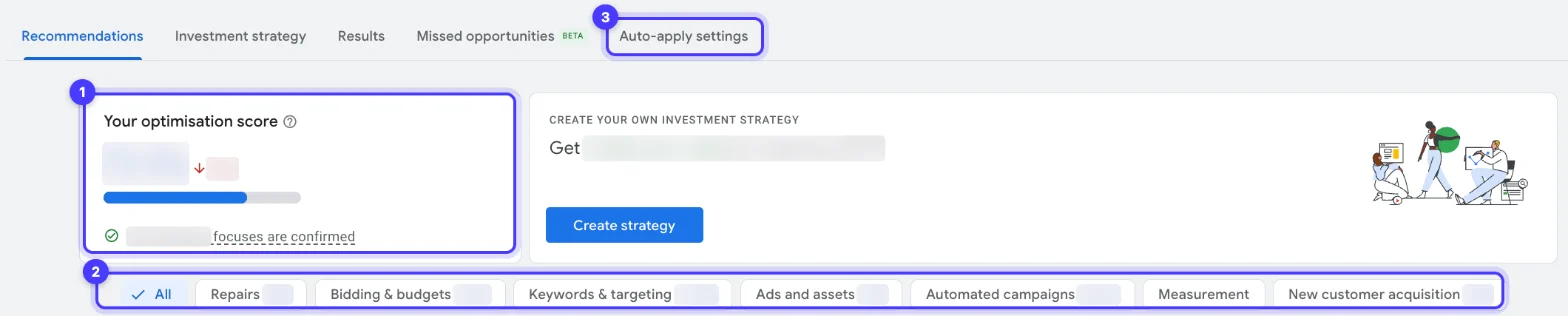
Inside Auto-apply settings there are two tabs:
- Manage lists every recommendation type that can be applied automatically, grouped by category, with a tick next to each one that is on.
- History shows each auto-applied type, how many times it was applied in the past week, and a Disable option.
The main Recommendations page also shows a queue of what auto-apply will run that day. Every applied change, automatic or manual, lands in Change history, which also records who opted the account in and when.

Run Better Ads: our free ecommerce guide
We’ve tracked $700m+ in ad revenue across 200+ brands. See how we work out what a sale can cost and choose which ad to test next.
What Google can apply automatically, and our call on each
These are the types Google lists for auto-apply today, grouped as Google groups them. Our recommendation is for an account where someone is managing budgets and targets on purpose.
| Category | Recommendation types | Our call |
|---|---|---|
| Keywords and targeting | Add broad match keywords; Add keywords; Add keywords (Smart bidding); Use targeting expansion; Use Display expansion; Expand your reach with Google search partners; Add audiences | Off. These widen who sees your ads and where, which moves spend and lead quality |
| Keywords and targeting | Remove redundant keywords; Remove non-serving keywords; Remove conflicting negative keywords | Off, review by hand. A keyword Google calls redundant may hold a bid, a landing page or a reporting split you set on purpose |
| Keywords and targeting | Add audience segments for reporting | Safe to leave on: observation segments report without narrowing or widening targeting |
| Bidding | Adjust your CPA targets; Adjust your ROAS targets; Set a target CPA or ROAS; Bid more efficiently with Maximise clicks, Maximise conversions, target CPA, target ROAS or Target impression share; Maximise conversion value | Off. Targets come from your margins, not from Google's estimate of what would spend more |
| Ads and assets | Improve your responsive search ads; Add dynamic search ads; Use optimised ad rotation | Off. Ad copy carries claims, prices and compliance wording a person should approve, and dynamic search ads open new search terms |
| Measurement | Upgrade your conversion tracking | Off, then do it yourself. Enhanced conversions are worth having, set up deliberately and tested |
Two limits Google states: auto-apply will not raise your budget, and recommendations only run when Google judges them relevant. Google removed Add responsive search ads from auto-apply from 26 January 2026. Search partners and Display expansion send ads beyond the searches and placements you chose. For a local business, check them alongside the location options in our guide to Google Ads location targeting, which decide who sees your ads in the first place.
How to turn auto-apply off, step by step
- Go to Campaigns, Recommendations, Auto-apply settings.
- On the Manage tab, untick each recommendation type you want to stop. To stop everything, untick every type in every category.
- Select Save.
- Open the History tab. If a type still shows, select it and choose Disable.
- Open Change history, filter to the last 30 days and look for changes made by recommendations. An applied recommendation can be undone from Change history within 30 days; a partly applied one cannot.
- Check your preferences: with campaign maintenance notifications on, Google emails a weekly summary of auto-apply activity, which is a useful alarm if someone switches it back on.
Auto-apply is set per account, so if you manage several accounts, repeat this in each one.
What optimisation score measures, and what it does not
Google defines optimisation score as an estimate of how well your account is set to perform, from 0 to 100%. It is calculated in real time at campaign, account and manager account level for active Search, Display, Video action, App, Performance Max, Demand Gen and Shopping campaigns. Each recommendation carries a score uplift: apply a recommendation with a 5% uplift and the score rises by 5%.
Three things follow from how it is built:
- Dismissing counts too. Google says an account can reach 100% by applying or dismissing all recommendations, and the page shows how much score is attributed to dismissed items. A high score can mean good decisions or a busy afternoon of clicking Dismiss.
- It is not Quality Score. Google says optimisation score is not used by Quality Score, so it does not change what you pay per click.
- It rewards Google's direction. Many of the largest uplifts come from broader match types, automated bidding and more reach. Those can be right for an account with clean conversion data and room to spend, and wrong for one that is still proving a margin.
The one group that has to care is agencies in the Google Partners programme: Google requires a Partners-registered manager account to hold a minimum optimisation score of 70%, checked daily. That is a reason to ask any agency how it keeps its score up. Dismissing irrelevant recommendations with a reason is a sound answer; auto-applying everything is not.
A 20-minute weekly recommendations review
This is the routine we run on accounts we manage. It keeps the useful fixes and turns the rest into a recorded decision.
- Repairs first. Filter by Repairs, Google's suggestions for things that are broken, such as disapproved assets. These are usually real and worth fixing the same day.
- Bidding and budgets against your numbers. Before you accept a new target, check it against break-even. Our Google Ads target ROAS planner shows the ROAS your margin can carry; if Google suggests lowering the target below it, dismiss.
- Keywords and targeting with search terms open. For any keyword suggestion, look at the search terms report for the same theme first. If broad match is suggested, test it in its own campaign with its own budget and negatives rather than letting it into a campaign that already works; our Google Ads account structure guide covers when a separate campaign is worth it.
- Ads and assets. Read the suggested headlines aloud. Apply only copy you would sign off.
- Dismiss with a reason. Dismissed items can come back after 30 or 60 days, so note in your weekly log why you dismissed, and the decision takes ten seconds next time.
- Check the Results tab for budget and target changes you applied: Google compares actual results with an estimate of what would have happened, as a 7-day rolling average over 28 days.
If you would rather hand this to someone, it is part of how we run Google Ads for Australian businesses at Hey Sage: every recommendation is applied or dismissed by a person, with the reason written down.
What makes an ad worth testing?
Explore 46 real ads and 17 landing pages. We break down the offer, the proof and what we’d try next.
Investment strategy and other budget suggestions
The Investment strategy tab proposes how to split budget across campaigns to get more clicks, conversions or conversion value. Applying it updates daily budgets immediately, and Google suggests checking the Results tab after 10 to 14 days. Treat it like any budget change: model the extra spend against your margin first. Our Google Ads cost in Australia guide covers how daily budgets, monthly limits and GST add up to the real charge on your card.
Budget recommendations are never auto-applied, so a budget jump in Change history came from a person or a script, not from auto-apply.
Questions we get about Google Ads recommendations
Does dismissing a recommendation improve optimisation score?
Yes. Google says applying or dismissing recommendations changes the score, and an account can reach 100% by applying or dismissing all of them. Dismissed recommendations can return after 30 or 60 days.
Does optimisation score affect my ad rank or cost per click?
No. Google states that optimisation score is not used by Quality Score. It reflects how many of Google's recommendations you have applied or dismissed, weighted by their estimated impact.
Can auto-apply increase my budget?
No. Google says auto-applying recommendations will not increase your budget. It can still change bidding targets, keywords and reach, which changes how fast the budget is spent and on what.
How do I see what Google changed automatically?
Open Recommendations, Auto-apply settings, History for each auto-applied type and how often it ran in the past week, and Change history for every individual change. Changes can be undone from Change history within 30 days.
What optimisation score do Google Partners need?
Google requires a Partners-registered manager account to keep a minimum optimisation score of 70%, checked daily, alongside spend and certification requirements.
Should I ever leave auto-apply on?
Only for types you would apply every time without reading them, such as adding audience segments for reporting. Anything that changes keywords, match types, bidding targets, ad copy or reach should be reviewed by a person.
Sources
- Google Ads Help: About applying recommendations automatically
- Google Ads Help: Manage auto-apply recommendations
- Google Ads Help: About optimisation score
- Google Ads Help: Apply or dismiss recommendations
- Google Ads Help: Types of recommendations
- Google Ads Help: About the Results tab in Google Ads recommendations
- Google Ads Help: About Recommended Investment Strategy
- Google Ads Help: How to become a Google Partner or Premier Partner